

Best Laptop & Computer Shop in Cumilla | Laptops, PCs & Tech Accessories

Buying a laptop or desktop computer is an important decision. The right device depends on how you plan to use it, your budget, the software you need, and the level of performance you expect.Are you looking for the best laptop shop in Cumilla?
For customers in Cumilla, there are many ways to compare computers and technology products. A local store can be useful because you can discuss your requirements, check products physically, compare different configurations, and ask about available support.
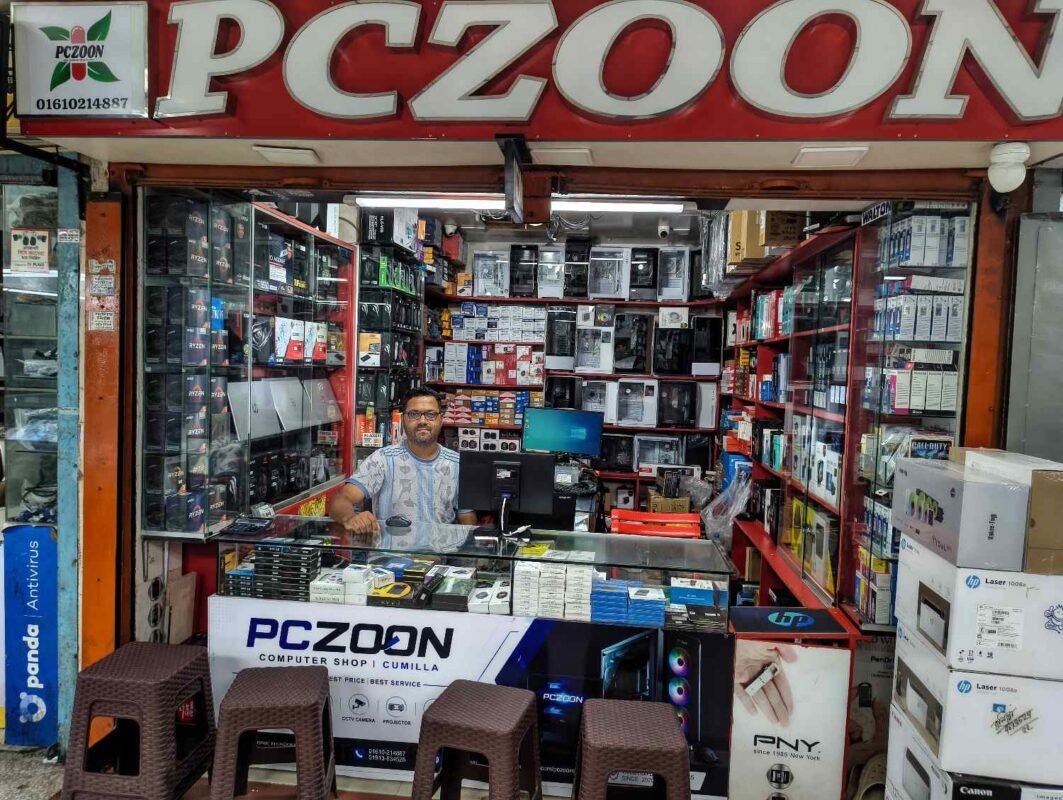
PCZOON is a computer and technology store in Cumilla offering laptops, desktop computers, PC components, accessories, networking products, printers, CCTV products and other technology solutions.and also best laptop shop in Cumilla
This guide explains some practical points to consider before purchasing a laptop or computer.
Start With Your Actual Requirements
A computer should be selected according to the work you need it to perform rather than simply choosing a specification because it looks impressive on paper.
A student, office employee, freelancer, gamer and video editor can have very different requirements.
Before visiting a computer shop, think about:
- What applications you normally use
- How much storage you need
- Whether you work with graphics or video
- Whether you need to carry the device regularly
- How many years you expect to use it
- Whether you may upgrade it later
- Your approximate budget
Having these points in mind makes it easier to compare suitable options.
Laptop Buying Guide for Customers in Cumilla
Laptops are available in many configurations, from basic models for everyday tasks to high-performance systems designed for gaming and professional workloads.
For Students and Everyday Users
For browsing, online classes, document work, presentations, communication and general study, a balanced laptop is usually more practical than an unnecessarily powerful configuration.
Useful considerations include:
- A suitable modern processor
- At least enough RAM for your daily applications
- SSD storage for faster startup and application loading
- A comfortable keyboard
- A display that is suitable for long sessions
- Reasonable battery performance
- A design that is easy to carry if portability matters
For Office and Business Work
Office users may need a computer for Microsoft Office, accounting software, email, meetings, web applications, printing and other business tasks.
For these users, reliability, storage, connectivity and comfortable everyday use can be more important than gaming-oriented hardware.
For Freelancing and Professional Work
Freelancers can have very different hardware requirements depending on their profession.
For example:
- Graphic designers may benefit from a good-quality display and stronger graphics capability.
- Video editors may need a more powerful processor, additional RAM and faster storage.
- Developers may benefit from additional memory and a capable processor.
- Digital marketers often need a system that handles multiple browser tabs and applications smoothly.
- Content creators may need a combination of CPU performance, RAM, storage and graphics capability.
The ideal configuration depends on the actual workload.
For Gaming
Gaming laptops and gaming desktops generally require more performance than a basic office computer.
Depending on the games and resolution, you may need:
- A capable processor
- Dedicated graphics
- Sufficient RAM
- Fast SSD storage
- Suitable cooling
- A display with an appropriate refresh rate
A gaming setup should be planned as a complete system rather than choosing a graphics card alone.
Desktop PC or Laptop: Which Fits Your Use?
Both laptops and desktop PCs have advantages.
A laptop is convenient when portability is important. It includes the main components in one compact device and can be used in different locations.
A desktop PC can be a better fit for customers who want a larger display, easier hardware upgrades, stronger cooling options or a system built around specific performance requirements.
Before choosing between them, consider where you will use the computer and whether you need to move it frequently.
Understanding the Main Computer Components
You do not need to be a hardware expert to make a good purchase. Understanding a few basic components can make comparison easier.
Processor
The processor affects general computing performance. When comparing processors, do not look only at the model name. Generation, architecture, core configuration and intended workload also matter.
RAM
RAM affects how comfortably a computer can handle multiple applications at the same time.
A system used for simple office tasks may need less memory than one used for professional editing, development or gaming.
It is also useful to check whether the computer supports future memory upgrades.
SSD and Storage
An SSD can make a noticeable difference in startup times and application responsiveness.
When selecting storage, consider both capacity and the type of storage technology being used. A larger drive can be useful if you store large files, games, videos or work projects.
Graphics Card
A dedicated graphics card can be important for gaming, 3D work, video production and other graphics-intensive applications.
For basic office and browsing tasks, a dedicated GPU may not be necessary.
Motherboard
For a desktop PC, the motherboard determines important compatibility and expansion options.
Before purchasing a motherboard, check processor socket compatibility, RAM support, storage interfaces, expansion slots and available connectivity.
Power Supply
The power supply is an important part of a desktop system because it provides power to the components.
A suitable PSU should match the overall hardware configuration and provide appropriate capacity and quality.
Cooling
Good cooling helps a computer operate within suitable temperatures during normal and demanding workloads.
Gaming and high-performance systems may require more capable air or liquid cooling depending on the components.
Why Product Inspection Matters
Specifications are useful, but they do not tell the whole story.
If you are purchasing a laptop in person, take time to examine the physical device and test important functions.
Depending on the product, you can check:
- Screen quality
- Keyboard
- Touchpad
- Speakers
- Webcam
- USB ports
- HDMI or display connections
- Charging connection
- Wi-Fi
- Bluetooth
- Storage condition
- Battery performance
- General operating performance
For a new product, also check the packaging, accessories and warranty information supplied with the device.
Checking Warranty and After-Sales Support
Warranty terms can vary between brands, products and sellers.
Before buying, ask for clear information about:
- Warranty period
- What components are covered
- Replacement conditions
- Service procedures
- Brand warranty versus seller support
- What documents are required for a warranty claim
Keeping the invoice and warranty documentation is also important after purchase.
PCZOON in Cumilla
PCZOON is a local computer and technology store located at:
F-508, 3rd Floor, Khondokar Haque Tower, Kandirpar, Cumilla.
The store serves customers looking for computers, laptops, PC components and technology accessories.
Depending on availability, customers can explore products such as:
- Desktop computers
- New laptops
- Custom-built PCs
- Gaming PCs
- Processors
- Motherboards
- RAM
- SSDs and other storage
- Graphics cards
- Power supplies
- Monitors
- Computer cases
- CPU coolers
- Keyboards and mice
- Headphones and other accessories
- Printers and scanners
- Networking products
- Routers and ONU devices
- CCTV and security products
- UPS and related equipment
PCZOON also provides computer-related services such as custom PC building, hardware upgrades, computer servicing, laptop support, CCTV solutions and networking assistance.
Product availability can change, so customers should confirm current stock, specifications, price and warranty information before purchasing.
Choosing a Computer for Different Budgets
A sensible computer purchase does not necessarily mean spending the maximum amount possible.
Instead, divide your budget according to the work you actually need to perform.
Entry-Level Use
For web browsing, documents, online learning, communication and basic office tasks, focus on a balanced configuration with sufficient RAM and SSD storage.
Mid-Range Use
For multitasking, programming, business applications, moderate creative work and casual gaming, a stronger processor, additional RAM and faster or larger storage may be useful.
Performance-Focused Systems
For gaming, video editing, 3D applications and other demanding workloads, more attention should be given to the processor, graphics card, memory, storage, cooling and power supply.
The most expensive component is not automatically the most important one. A balanced configuration usually makes more sense.
Common Mistakes to Avoid
Buying Only Because of the Processor Name
Two computers with the same processor series can provide different overall experiences because of differences in RAM, storage, cooling, display, graphics and other components.
Ignoring Upgrade Options
If you plan to keep a computer for several years, check whether RAM, storage or other components can be upgraded.
Choosing Storage Without Considering Your Files
A computer used for documents may require relatively little storage, while gaming, photography and video work can quickly consume hundreds of gigabytes.
Forgetting About Connectivity
Check the ports and wireless features you actually need. USB, HDMI, Ethernet, Wi-Fi, Bluetooth and other connections can be important depending on your setup.
Focusing Only on Price
A lower initial price may not always represent better value if the configuration does not meet your requirements or future needs.
Questions to Ask Before Buying
Before paying for a computer or laptop, it is useful to confirm a few details:
- What exact processor and generation does it use?
- How much RAM is installed?
- Can the RAM be upgraded?
- What type and capacity of storage is included?
- Is there a dedicated graphics card?
- What display specifications does the laptop or monitor have?
- What warranty is included?
- Which accessories are included?
- Is the product new and officially packaged?
- What support is available after purchase?
These questions can help prevent misunderstandings and make product comparisons easier.
New Laptop or Desktop PC?
There is no single computer that is suitable for every customer.
Choose a laptop when portability, compactness and working from different locations are important.
Consider a desktop PC when you want a larger workspace, easier upgrades, stronger cooling options or a configuration built around specific hardware requirements.
For customers who are unsure, discussing the intended workload and budget with a knowledgeable computer retailer can make the selection process simpler.
Computer and Technology Products in Cumilla
Cumilla has a growing market for computers, laptops, components and other technology products. Customers can compare different brands and configurations depending on their needs.
PCZOON provides a range of computer and technology products from its store at Khondokar Haque Tower, Kandirpar, Cumilla. The store is intended to serve different types of users, including students, home users, offices, businesses, freelancers and gamers.
Whether you need a new laptop, desktop computer, custom PC, component or accessory, it is useful to compare specifications, warranty terms and overall suitability before making a purchase.
Frequently Asked Questions
Where can I buy a laptop in Cumilla?
You can compare laptops from local computer retailers in Cumilla. PCZOON, located at Khondokar Haque Tower in Kandirpar, offers laptops and other computer products, subject to current stock.
Where can I buy a desktop PC in Cumilla?
Desktop PCs are available from computer stores in Cumilla. PCZOON offers desktop computers and can also help customers explore configurations for office work, home use, gaming and other requirements.
Does PCZOON sell computer components?
PCZOON offers a range of PC components, including processors, motherboards, RAM, SSDs, graphics cards, power supplies, cooling products and computer cases, depending on current availability.
Can I build a custom PC at PCZOON?
PCZOON provides custom PC building services. A suitable configuration can be planned around the customer’s budget, intended applications and upgrade requirements.
What should I check before buying a laptop?
Check the processor, RAM, storage, display, battery, keyboard, connectivity, warranty and overall condition. For a new laptop, also confirm the included accessories and warranty documentation.
Is a desktop PC better than a laptop?
It depends on how the computer will be used. A laptop offers portability, while a desktop can provide more flexibility for upgrades, cooling and component selection.
Where is PCZOON located?
PCZOON is located at F-508, 3rd Floor, Khondokar Haque Tower, Kandirpar, Cumilla, Bangladesh.
Final Thoughts
Buying a computer is easier when the decision starts with your actual requirements rather than a list of specifications.
Think about your workload, budget, portability needs, storage requirements and future upgrades. Then compare complete configurations, warranty information and after-sales support.
For customers in Cumilla, PCZOON offers laptops, desktop PCs, components, accessories and other technology products from its Kandirpar location.
PCZOON
F-508, 3rd Floor, Khondokar Haque Tower, Kandirpar, Cumilla