

Computer Shop Near Me in Comilla | PCZOON

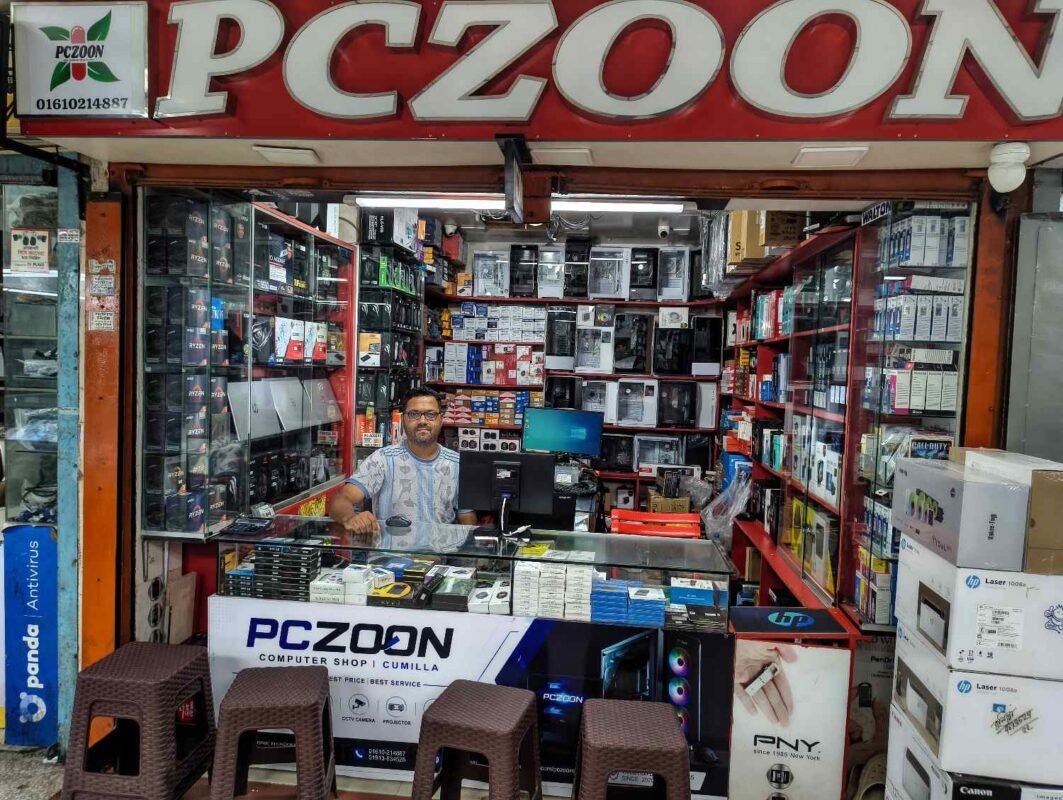
Computer Shop Near Me in Comilla: Computers, Laptops, Accessories & IT Solutions | PCZOON
When searching for a computer shop near me, customers often want more than a place to buy a computer. They need a reliable store where they can compare products, choose suitable specifications, find essential accessories, and get guidance before making a purchase. For customers in Comilla (Cumilla), PCZOON offers a local destination for exploring computers, laptops, PC components, gaming equipment, networking products, printers, CCTV solutions, and other technology essentials.
Located at F-508, 3rd Floor, Khondokar Haque Tower, Kandirpar, Comilla, PCZOON serves customers looking for technology products for home, education, office work, business, freelancing, and gaming. Whether you are planning to purchase your first computer, upgrade an existing desktop, or find accessories for your laptop, choosing products based on your actual needs and budget can help you make a better decision.
Visit the PCZOON website to explore available products and contact the store for current stock, pricing, and product details.
Find a Computer Shop Near You in Comilla
Choosing a nearby computer store can make product selection and after-sales communication more convenient. Instead of buying hardware without understanding its compatibility or performance, customers can seek guidance about the specifications that suit their daily work.
PCZOON provides access to a range of computer-related product categories, from complete desktop systems and laptops to individual components and peripherals. Product availability may vary, so it is helpful to confirm the model, warranty, and price before visiting.
Customers can explore options for:
- Desktop computers for everyday use, study, and office work
- Custom-built PCs for gaming, professional applications, and multitasking
- New laptops for students, professionals, and businesses
- Processors, motherboards, RAM, SSDs, and other PC components
- Graphics cards, power supplies, casings, and cooling equipment
- Monitors, keyboards, mice, headphones, and other accessories
- Printers, scanners, ink, and toner
- Routers, networking equipment, and ONU devices
- CCTV cameras, recording equipment, and UPS solutions
Computer Products Available at PCZOON
1. Desktop Computers
A desktop computer is a practical choice for people who need a dependable workstation for everyday tasks. Desktop systems can be used for document preparation, internet browsing, online classes, business applications, accounting, entertainment, and many other activities.
When choosing a desktop PC, consider the processor, RAM capacity, storage type, motherboard, power supply, and monitor. A computer for basic office work may require different specifications from a system used for programming, graphic design, or demanding applications.
At PCZOON, customers can explore desktop computer options based on their intended use and budget. You can also compare complete systems with custom-built configurations to understand which option offers the best value for your requirements.
2. Custom-Built Computers
A custom-built computer allows you to select individual components instead of purchasing a fixed configuration. This approach can be useful when you want a particular balance of performance, storage, graphics capability, and future upgrade options.
For example, a student may prioritise a capable processor, sufficient memory, and fast SSD storage. A professional may need additional memory and storage for multitasking. A gaming enthusiast may require a dedicated graphics card, suitable power supply, effective cooling, and a monitor that matches the system’s performance.
Before building a PC, check that the processor and motherboard are compatible, the casing supports the chosen components, and the power supply can handle the system’s requirements. PCZOON can be a local starting point for exploring suitable components and discussing a configuration. Confirm the availability of specific assembly services before placing an order.
3. Gaming PCs
Gaming computers are designed to run games smoothly at the resolution and graphics settings a user prefers. Their performance depends on the combined capabilities of the processor, graphics card, memory, storage, cooling system, and display.
Entry-level gaming configurations may be suitable for lighter games and esports titles, while more demanding modern games may require a stronger graphics card and processor. A balanced configuration is usually better than spending most of the budget on one component while neglecting the others.
When choosing a gaming PC, consider your favourite games, target resolution, desired frame rate, budget, and plans for future upgrades. Also remember to account for the monitor, keyboard, mouse, headset, and any required UPS when estimating the complete setup cost.
4. Laptops for Study, Work, and Business
Laptops are suitable for customers who need a portable computer for education, office tasks, online meetings, travel, freelancing, and everyday use. Unlike a desktop system, a laptop integrates its screen, keyboard, battery, and core computer hardware into one portable device.
Before purchasing a laptop, compare the processor, RAM, SSD capacity, display quality, battery expectations, weight, available ports, and warranty terms. Students and office users may prefer a lightweight model with good battery life, while professionals working with demanding software may need stronger processing or graphics performance.
Explore the PCZOON laptop category to check available options. For a particular model, confirm its exact specifications, condition, included accessories, and current price with the store.
5. Processors (CPU)
The processor, or central processing unit (CPU), performs the calculations and instructions that allow a computer to run applications. It influences responsiveness and performance in tasks such as office work, gaming, programming, multitasking, and content creation.
When comparing processors, consider the model generation, number of cores and threads, supported memory, power requirements, and intended workload. Some processors include integrated graphics, while others need a separate graphics card for display output. Integrated graphics capability varies by model.
Processor compatibility is particularly important when upgrading a desktop. Check the motherboard socket, supported processor list, BIOS requirements, and cooling needs before buying a CPU.
6. Motherboards
The motherboard connects the processor, RAM, storage, graphics card, and other components. It determines important compatibility features, including the supported processor platform, memory type, expansion slots, storage connections, and rear-panel ports.
Motherboards are available in different sizes and feature levels. A suitable model should support your selected CPU and RAM while providing enough connectivity for current and future needs.
Before purchasing a motherboard, confirm its socket, chipset, DDR4 or DDR5 memory support, M.2 slots, PCIe expansion, networking features, and physical size. Choosing the motherboard and processor together helps avoid compatibility problems during assembly or an upgrade.
7. Desktop RAM
RAM, or random-access memory, provides temporary working space for programs and active tasks. Having enough RAM can improve multitasking and help applications run smoothly, particularly when several browser tabs or demanding programs are open.
The appropriate capacity depends on how you use your computer. Basic tasks may need less memory than professional software, heavy multitasking, or gaming. Compatibility also matters: desktop memory must match the motherboard’s supported generation and specifications.
When upgrading RAM, check the existing modules, available slots, maximum supported capacity, and recommended configuration. DDR4 and DDR5 memory are not interchangeable, so verify the motherboard requirements before buying.
8. SSD, NVMe SSD, and Hard Drives
Storage holds your operating system, applications, documents, photos, videos, and games. A solid-state drive (SSD) generally provides faster loading and boot times than a traditional mechanical hard drive.
SATA SSDs are useful for many upgrades, while NVMe SSDs use the PCIe interface and can provide higher transfer speeds when supported by the system. Traditional HDDs remain useful where large storage capacity is a priority.
When selecting storage, compare capacity, interface, physical format, performance, warranty, and the number of available motherboard connections. For many users, an SSD for the operating system and applications offers a noticeable improvement in everyday responsiveness.
9. Graphics Cards (GPU)
A graphics card processes visual information and is especially important for gaming, 3D applications, video editing, rendering, and other graphics-intensive work. Some desktop computers rely on integrated graphics, while more demanding workloads may require a dedicated GPU.
When choosing a graphics card, consider its performance at your target resolution, video memory, physical dimensions, power consumption, required power connectors, and the capabilities of your power supply. Check that the card fits inside the casing and that the rest of the system can support it.
The most expensive graphics card is not always the right choice. A balanced system should match the GPU to the processor, display, workload, and available budget.
10. Power Supply Units (PSU)
The power supply converts electricity from the wall outlet into the power required by the computer’s components. A reliable, appropriately rated PSU is essential for stable operation.
When selecting a power supply, consider total system power requirements, connector availability, build quality, protection features, warranty, and efficiency certification. An efficiency rating alone does not tell you everything about a PSU’s quality, so model-specific information matters.
Avoid choosing a power supply based only on its advertised wattage or the lowest price. The correct unit should provide sufficient capacity and the connections required by your CPU and graphics card.
11. PC Casings and Gaming Cases
A computer casing houses the motherboard, power supply, storage drives, graphics card, and cooling equipment. It also affects airflow, component clearance, cable management, and the overall appearance of a desktop PC.
Gaming cases may include tempered-glass panels, RGB or ARGB fans, and additional space for cooling components. However, appearance should not be the only consideration. Check motherboard size compatibility, graphics-card length, CPU cooler height, radiator support, and airflow design.
A suitable casing makes the system easier to assemble, maintain, and upgrade in the future.
12. CPU Coolers, Case Fans, and Liquid Cooling
Cooling equipment helps prevent processors and other components from overheating under load. Depending on the system, cooling options may include a stock CPU cooler, an aftermarket air cooler, additional case fans, or an all-in-one liquid cooler.
The right cooling solution depends on processor power, workload, casing dimensions, airflow, noise preferences, and budget. More cooling equipment is not automatically better if it is installed incorrectly or does not improve airflow.
Before buying a cooler, verify socket compatibility, height or radiator clearance, mounting support, and fan or pump connections. Good airflow and proper installation can help maintain stable system performance.
13. Computer Monitors
A monitor displays the output from your computer and can make a significant difference to work, entertainment, and gaming. Important features include screen size, resolution, panel type, refresh rate, response characteristics, brightness, and available connections.
For everyday office work, a comfortable display with suitable resolution may be sufficient. Designers may prioritise colour reproduction, while gamers may prefer a higher refresh rate and suitable response performance.
Make sure the monitor’s inputs match the outputs available from your computer. Also consider desk space, viewing distance, stand adjustment, and whether you need a monitor mount.
14. Keyboards, Mice, and Headsets
Keyboards, mice, and headsets are essential accessories for many computer users. A comfortable keyboard and mouse can improve everyday usability, while gaming peripherals may offer additional buttons, adjustable sensitivity, customisation, or specialised layouts.
Headsets and headphones are useful for online classes, video calls, entertainment, and gaming. Microphone quality, comfort, connection type, and compatibility should be considered before buying.
The best accessory is not necessarily the most expensive one. Choose products according to how often you use them, your comfort preferences, required features, and budget.
15. Computer Accessories and Connectivity Products
Computer accessories include USB hubs, cables, adapters, webcam devices, Bluetooth adapters, storage accessories, cleaning tools, cooling pads, and other items that make a computer setup more convenient.
Before purchasing an accessory, check its connector type, supported standards, operating-system compatibility, and intended use. For example, not every USB-C port supports the same display or data features, and not every adapter supports every device.
Buying the correct accessory helps reduce connection issues and makes it easier to use your computer with existing equipment.
16. Printers and Scanners
Printers and scanners are useful for homes, schools, offices, shops, and businesses. Inkjet printers can be suitable for general documents and colour printing, while laser printers are often considered for regular document workloads. The best option depends on print volume, colour requirements, speed, and running costs.
Before purchasing a printer, compare its supported paper sizes, connectivity, printing technology, scan functions, and consumable costs. A low initial purchase price may not mean the lowest long-term cost.
Customers should also check the availability and compatibility of replacement ink, toner, and other consumables for the selected model.
17. Printer Ink, Toner, and Printing Supplies
Ink and toner are consumables used by different types of printers. Ink cartridges or ink bottles are associated with inkjet printers, while toner cartridges are used in laser printers.
The correct supply depends on the exact printer model and cartridge series. Using an incompatible cartridge may result in printing errors or poor results, so check the model number before purchasing.
For regular business or office printing, consider page yield, print quality, cost per page, and manufacturer guidance when comparing supplies. Confirm current stock and compatibility before visiting the shop.
18. Routers and Networking Devices
Routers and networking devices connect computers, phones, smart TVs, and other equipment to a local network and the internet. The appropriate device depends on your internet connection, home or office layout, number of connected devices, and wireless coverage requirements.
When choosing a router, compare Wi-Fi standards, frequency bands, Ethernet ports, coverage expectations, security features, and support for your internet service. Larger homes or offices may need additional access points or a mesh Wi-Fi system rather than a single router.
Network performance also depends on the internet connection, placement of the equipment, building structure, and interference from nearby wireless networks.
19. ONU and Fibre Networking Equipment
An ONU, or optical network unit, is used in many fibre-optic broadband installations to connect a subscriber’s network to the service provider’s fibre system. Different devices may support different technologies and configurations, so compatibility is essential.
Before purchasing an ONU, confirm whether your internet service provider supports the device, whether it uses GPON, EPON, or another required standard, and whether the optical specifications and configuration are appropriate for your connection.
Customers should consult their ISP or network technician when replacing or configuring fibre equipment. Buying a device with the wrong compatibility can prevent the connection from working.
20. CCTV Cameras and Security Equipment
CCTV systems help monitor homes, shops, offices, warehouses, and other properties. Depending on the requirements, a system may include cameras, a DVR or NVR recorder, storage, cabling, networking equipment, and a display or mobile viewing setup.
Customers can compare indoor and outdoor cameras, resolution, night vision, viewing angle, storage requirements, recording features, and remote-access options. IP camera systems and traditional analogue systems use different equipment and connections.
Before buying, assess the areas that need monitoring, available lighting, network access, installation conditions, and storage duration. Confirm whether installation and technical support are available for the particular system.
21. UPS and Power Backup Solutions
A UPS, or uninterruptible power supply, provides temporary backup power and may help protect connected equipment from certain power disturbances. It can be useful for desktop computers, routers, CCTV equipment, and selected office devices.
The appropriate UPS depends on the total power draw of connected devices, required backup duration, battery capacity, and the type of load. A small unit intended for a router may not provide sufficient backup for a desktop PC and monitor.
Before purchasing, calculate the connected load and discuss your expected backup time. A UPS is not a substitute for a properly installed electrical protection system.
22. New and Second-Hand Computers
Customers with different budgets may consider either a new computer or a second-hand system. New products may offer a manufacturer warranty and current specifications, while used products may provide a lower upfront cost depending on the model and condition.
For a used computer or laptop, check its physical condition, processor, RAM, storage health, display, keyboard, ports, battery where applicable, and included accessories. Ask about the warranty or return terms, if any, before making a purchase.
Do not choose a used computer based on price alone. The age of the hardware, repair history, upgrade options, and suitability for your intended applications all affect its overall value.
Computer Servicing, Upgrades, and Technical Support
Buying a computer is only one part of owning a reliable system. Over time, users may need to improve performance, replace components, troubleshoot problems, or maintain their equipment.
Depending on the services currently offered, customers may enquire about:
- Computer upgrades: Adding compatible RAM or SSD storage, or evaluating other component upgrades.
- Desktop troubleshooting: Identifying possible hardware or software issues.
- Custom PC assistance: Selecting compatible components for a planned build.
- Laptop repair enquiries: Discussing symptoms such as charging problems, overheating, or display faults.
- Networking support: Troubleshooting routers, connectivity, and related equipment.
- CCTV solutions: Discussing camera, recorder, storage, and installation requirements.
Service availability, diagnostic fees, repair times, parts, and warranty terms should be confirmed directly with PCZOON before arranging a service.
Why Buy from PCZOON?
Choosing a computer shop involves more than comparing prices. Product compatibility, accurate specifications, warranty information, and useful guidance can all affect the buying experience.
1. A Convenient Local Store in Comilla
PCZOON is located at Khondokar Haque Tower in Kandirpar, Comilla. For customers in the area, a local store can make it easier to ask questions about products, compare suitable options, and discuss purchases directly.
2. Multiple Technology Categories in One Place
From desktop computers and laptops to PC components, monitors, printers, networking products, and accessories, PCZOON covers a range of computer-related categories. You can enquire about several parts of a complete setup without researching every category separately.
3. Product Selection Based on Your Needs
Different users require different specifications. A student, office employee, freelancer, designer, and gamer may all need different hardware. Explain your intended use and budget before purchasing so you can compare suitable configurations rather than paying for features you do not need.
4. Help with Component Compatibility
Building or upgrading a PC requires attention to processor sockets, memory generations, power requirements, physical dimensions, cooling, and storage interfaces. Checking these details before buying can help reduce the risk of purchasing incompatible parts.
5. Clear Product and Warranty Information
Before making a purchase, customers should be able to confirm the exact model, included accessories, product condition, warranty coverage, and applicable service terms. PCZOON customers are encouraged to verify these details for each product before completing an order.
6. Options for Different Budgets and Uses
A computer for basic study does not need the same configuration as a high-performance gaming or professional workstation. Comparing options by workload, upgrade potential, and total system cost helps customers make a more informed choice.
7. A Local Point of Contact
Having a store to contact about product questions can be useful after a purchase. For current availability, pricing, warranty conditions, and any technical services, contact PCZOON directly rather than relying on outdated third-party listings.
How to Choose the Right Computer Shop Near You
Before choosing a computer store, use these practical checks:
- Define your requirements. Decide whether the computer is for study, office work, gaming, design, business, or general use.
- Set a realistic budget. Include the monitor, keyboard, mouse, UPS, software, and other accessories you may need.
- Compare exact specifications. Check complete model numbers rather than relying only on broad product names.
- Check compatibility. For PC builds, verify the processor, motherboard, RAM, graphics card, PSU, casing, and cooling requirements.
- Ask about the warranty. Confirm whether the warranty is provided by the manufacturer, distributor, or seller and understand any exclusions.
- Confirm stock and price. Product prices and availability can change, so contact the store before travelling.
- Keep your purchase documents. Retain invoices and warranty information for future reference.
For customers searching online for a computer shop near me, these steps can help identify a store that offers suitable products and clear information instead of relying on promotional claims alone.
Visit PCZOON in Comilla
If you are looking for computers, laptops, desktop components, gaming accessories, printers, networking equipment, or other technology products in Comilla, PCZOON is a local store worth contacting to check your options.
Store: PCZOON
Address: F-508, 3rd Floor, Khondokar Haque Tower, Kandirpar, Comilla, Bangladesh
Phone: 01610-214887
Website: https://pczoon.com/
Google Maps: Find PCZOON on Google Maps
Contact the store to confirm current product availability, prices, warranty details, and service options before visiting.
Frequently Asked Questions (FAQs)
1. Where can I find a computer shop near me in Comilla?
If you are in Comilla, you can contact PCZOON at F-508, 3rd Floor, Khondokar Haque Tower, Kandirpar. Check the store’s website or Google Maps listing for directions and confirm current opening hours before visiting.
2. Does PCZOON sell desktop computers?
PCZOON covers the desktop computer category. Contact the store to check which complete desktop systems and configurations are currently available and whether a particular specification can be arranged.
3. Can I buy a laptop from PCZOON?
You can explore laptop options through the PCZOON laptop category. Confirm the exact model, processor, RAM, storage, warranty, and current price before purchasing.
4. Can I build a custom gaming PC in Comilla?
A custom PC is built by selecting compatible components for a specific workload and budget. Contact PCZOON to discuss your preferred processor, graphics card, memory, storage, and other requirements, and confirm the availability of assembly services.
5. Does PCZOON sell computer components separately?
PC components include processors, motherboards, RAM, SSDs, graphics cards, power supplies, casings, and cooling equipment. Ask PCZOON about current stock and the compatibility of the parts you need.
6. What should I check before buying a desktop computer?
Compare the processor, RAM, SSD capacity, graphics capability, motherboard, PSU, and warranty. Choose specifications according to the applications you intend to run rather than buying a system based on one component alone.
7. Which computer is best for students?
The best computer depends on the student’s courses and applications. For general study, browsing, online classes, and documents, a suitable entry-level desktop or laptop may be sufficient. Technical, design, and engineering courses may require stronger specifications.
8. Is a desktop computer better than a laptop?
A desktop generally offers greater flexibility for component upgrades and may provide better performance for a similar budget, depending on the configuration. A laptop is more suitable when portability and an integrated battery-powered setup are important.
9. Can I purchase a second-hand computer?
Used computers can be a budget-conscious option, but inspect their condition, specifications, storage health, and upgrade options. Ask about any applicable warranty or return policy and confirm whether second-hand units are currently available.
10. Does PCZOON sell RAM and SSDs?
RAM and SSDs are common PC component categories. Confirm current stock, capacity, model, interface, and compatibility with your computer before purchasing.
11. Where can I buy a graphics card in Comilla?
You can contact PCZOON to enquire about graphics cards and suitable configurations. Before buying, verify the exact GPU model, power requirements, casing clearance, warranty, and current price.
12. Does PCZOON sell monitors and gaming accessories?
PCZOON covers computer peripherals and accessories, including monitors and gaming-related equipment. Contact the store to check available models, display specifications, connectivity, and prices.
13. Can I buy a printer and toner from a computer shop?
Computer stores may carry printers, ink, toner, and related supplies. Always verify the printer model and consumable number to make sure the replacement ink or toner is compatible.
14. Can I purchase a router or networking device at PCZOON?
You can contact PCZOON about routers and networking equipment. When choosing a device, consider your internet connection, required Wi-Fi coverage, connected devices, and compatibility with your service provider.
15. Does PCZOON offer CCTV cameras and equipment?
PCZOON covers CCTV and security equipment categories. Ask about current camera, DVR, NVR, and accessory availability, and confirm whether installation or technical support is offered for your requirements.
16. Can I get my computer upgraded or repaired?
Contact PCZOON to ask which upgrade, troubleshooting, and repair services are currently available. Describe the problem or your existing computer specifications so the store can advise you about the next steps.
17. How can I check computer prices in Comilla?
Prices vary according to the model, specifications, brand, warranty, and market availability. Check the current product listing where available or contact PCZOON directly for an updated price before visiting.
18. Should I check warranty details before buying a computer?
Yes. Confirm the warranty duration, coverage, service process, and any exclusions. Keep your invoice and warranty documentation in case you need support later.
19. Where is PCZOON located?
PCZOON is located at F-508, 3rd Floor, Khondokar Haque Tower, Kandirpar, Comilla, Bangladesh. Use the Google Maps link above to help plan your visit.
20. How do I contact PCZOON?
Visit pczoon.com or call 01610-214887 to enquire about products, current prices, availability, and service options.
Final Thoughts
Finding the right computer shop near you means choosing products that match your requirements, checking specifications carefully, and understanding the warranty and support terms before purchasing. Whether you need a desktop computer, laptop, gaming setup, individual PC components, printing supplies, networking equipment, or accessories, compare your options and ask questions before making a decision.
For customers in Comilla, PCZOON at Khondokar Haque Tower, Kandirpar is a local destination to explore computer and technology products. Contact the store to discuss your needs, confirm available products, and find an option that suits your budget and intended use.