

Laptop Shop Near Me in Comilla | PCZOON

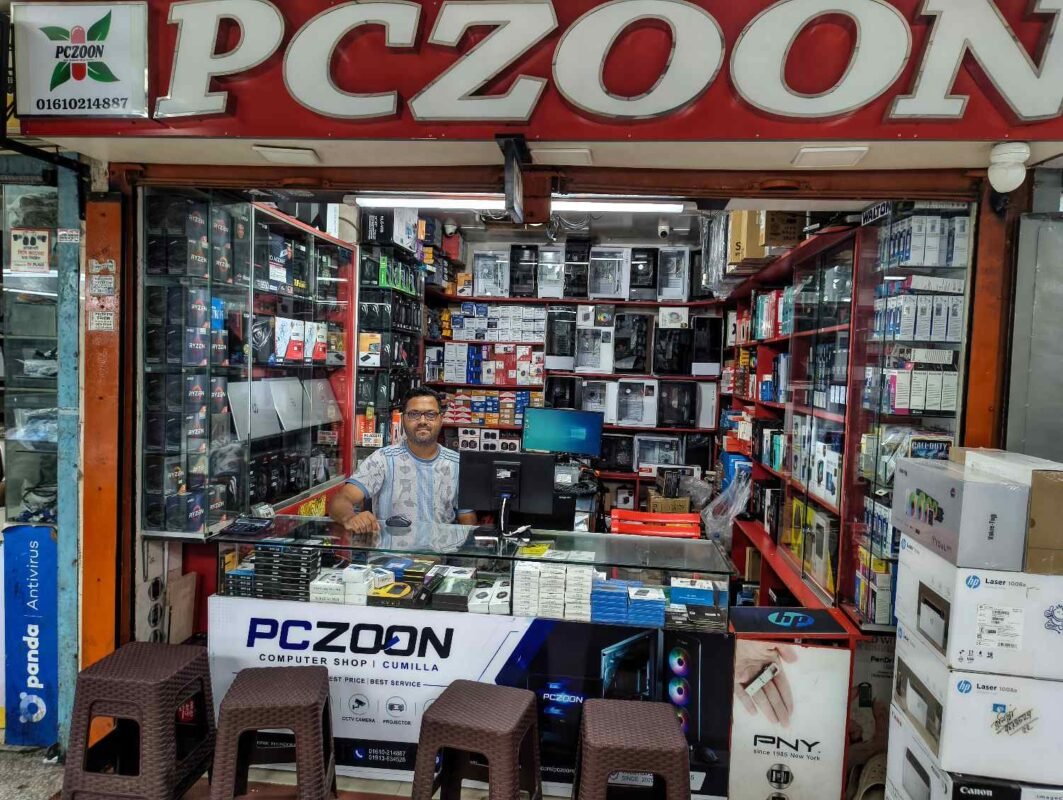
Laptop Shop Near Me in Comilla: Laptops, Accessories & Computer Solutions | PCZOON
When people search for a laptop shop near me, they are usually looking for a convenient local store where they can compare laptops, understand specifications, check prices, and get reliable guidance before making a purchase. A laptop is a long-term investment, so choosing the right model involves more than simply finding the lowest price.
For customers in Comilla (Cumilla), PCZOON provides a local place to explore laptops, computer accessories, storage devices, memory, monitors, networking products, printers, and other technology solutions. The goal is to help customers find products that match their actual requirements, whether they need a laptop for education, office work, business, freelancing, programming, creative work, entertainment, or gaming.
PCZOON is located at F-508, 3rd Floor, Khondokar Haque Tower, Kandirpar, Comilla, Bangladesh. Customers can contact the store to check current laptop models, prices, availability, warranty information, and related products before visiting.
Looking for a Laptop Shop Near You in Comilla?
Buying from a nearby laptop store can make the purchasing process easier because you can discuss your requirements directly and compare different options. Laptop specifications can vary considerably even between models that look similar, so understanding the processor, RAM, storage, display, battery, graphics, and warranty is important.
At PCZOON, customers can explore laptop options for different types of users, including:
- Students and online learners
- Office employees and business users
- Freelancers and remote workers
- Programmers and developers
- Graphic designers and content creators
- Gamers
- Home users
- Small businesses and professionals
- Customers looking for budget-friendly laptops
Laptop availability changes regularly, so it is always advisable to confirm the exact model and current price before making a trip to the store.
Laptops Available for Different Types of Users
There is no single laptop that is perfect for everyone. The ideal configuration depends on what software you use, how frequently you travel, how much storage you need, and how much performance you expect.
1. Student Laptops
Students commonly need laptops for online classes, assignments, research, presentations, browsing, document editing, and educational software.
A suitable student laptop does not necessarily need the highest-end processor or dedicated graphics card. A balanced combination of processor performance, sufficient RAM, fast SSD storage, comfortable display, and reasonable battery life can be more useful.
When choosing a laptop for a student, consider:
- Processor generation and performance
- RAM capacity
- SSD storage
- Screen size and resolution
- Battery expectations
- Weight and portability
- Available USB and display ports
- Warranty
A properly selected student laptop can remain useful for several years as academic requirements change.
2. Office and Business Laptops
Office users may spend several hours each day working with documents, spreadsheets, email, web applications, video conferences, and business software.
For this type of user, keyboard comfort, display quality, reliability, storage, and multitasking capability are important. A lightweight model can also be useful for professionals who frequently travel between meetings or workplaces.
Before buying an office laptop, consider the applications you use every day rather than focusing only on processor model numbers.
3. Freelancing and Remote Work Laptops
Freelancers may use laptops for web development, digital marketing, graphics, video editing, virtual assistance, programming, and other online work.
The appropriate configuration depends heavily on the freelancer’s profession. A web developer may prioritise RAM and processor performance, while a video editor or designer may need stronger graphics capabilities and a colour-accurate display.
If the laptop will be your primary income-generating device, reliability, warranty, storage, and upgrade options should also be considered.
4. Programming and Development Laptops
Programming workloads vary from simple web development to software development, virtual machines, databases, mobile development, and other demanding environments.
A laptop for development should have enough RAM and storage for your development tools, projects, browsers, and other applications. Processor performance becomes increasingly important when compiling large projects or running multiple development environments.
Developers should also check keyboard comfort, display resolution, connectivity, battery expectations, and operating-system compatibility before purchasing.
5. Graphics and Creative Work Laptops
Graphic designers, video editors, photographers, and content creators may require more powerful hardware than general office users.
Important considerations can include:
- Processor performance
- Dedicated graphics capability
- RAM capacity
- SSD speed and capacity
- Display resolution
- Colour reproduction
- External display support
- Cooling performance
Software requirements should guide the purchase. Always check the recommended hardware specifications of the applications you intend to use.
6. Gaming Laptops
Gaming laptops combine portability with hardware designed for demanding games. They commonly feature stronger processors, dedicated graphics, higher-refresh-rate displays, improved cooling, and larger power adapters.
When choosing a gaming laptop, compare:
- Dedicated GPU model
- Processor performance
- Graphics memory
- RAM capacity
- SSD capacity
- Display refresh rate
- Resolution
- Cooling design
- Upgrade possibilities
A gaming laptop should be evaluated as a complete system rather than by looking at the graphics card alone.
7. Budget Laptops
Budget laptops can be suitable for everyday tasks such as browsing, email, document editing, online learning, video playback, and basic office work.
The key is to choose a balanced configuration rather than buying a laptop simply because it has a low price. A model with an SSD and sufficient RAM can provide a much better everyday experience than an older configuration with slower storage.
If your workload may increase in the future, consider whether the laptop provides enough performance and storage for your expected usage.
Understanding Laptop Specifications Before Buying
Laptop specifications can be confusing, especially when comparing several models. Understanding the major components can make the decision easier.
8. Laptop Processor
The processor is one of the most important components in a laptop. It handles the instructions required by the operating system and applications.
Different processors are designed for different levels of performance and power consumption. A processor suitable for web browsing may not be ideal for video editing, programming, or gaming.
When comparing processors, look at the exact model and generation rather than relying only on the brand name. Also consider the number of cores, performance characteristics, integrated graphics, and power requirements.
9. Laptop RAM
RAM provides temporary working memory for applications. More RAM can help when running multiple applications simultaneously.
For example, someone working with numerous browser tabs, office applications, development tools, or creative software may benefit from more memory than a user performing basic tasks.
Before purchasing, check:
- Total RAM capacity
- RAM type
- Whether the RAM is upgradeable
- Number of available memory slots
- Maximum supported memory
Some modern laptops have memory permanently integrated into the motherboard, so upgradeability should be checked before purchase.
10. Laptop SSD Storage
Modern laptops commonly use SSD storage because it can provide faster booting and application loading compared with traditional mechanical hard drives.
When choosing an SSD, consider both capacity and interface. A larger SSD provides more space for applications, documents, photos, videos, and games.
If you regularly work with large files, video projects, or games, a higher-capacity drive may be more practical than a small SSD that requires frequent storage management.
11. Laptop Display
The display is something you interact with every time you use a laptop.
Important characteristics include:
- Screen size
- Resolution
- Panel technology
- Brightness
- Colour reproduction
- Refresh rate
- Viewing angles
Office users may prioritise comfortable viewing and adequate resolution, while designers may place greater importance on colour accuracy. Gamers may prefer a higher refresh rate.
Consider how and where you will use the laptop before deciding which display characteristics matter most.
12. Integrated and Dedicated Graphics
Some laptops use integrated graphics built into the processor, while others include a separate dedicated graphics processor.
Integrated graphics can be sufficient for everyday computing, office work, education, browsing, and many light applications.
Dedicated graphics are more appropriate for workloads such as demanding gaming, 3D applications, certain creative workloads, and GPU-accelerated software.
Do not automatically choose a laptop with dedicated graphics unless your workload requires it. A dedicated GPU can affect price, weight, battery life, heat, and power consumption.
13. Laptop Battery
Battery performance depends on many factors, including processor design, screen brightness, software, workload, battery capacity, and power-management settings.
Manufacturers’ battery figures are often measured under specific test conditions, so real-world usage can differ.
If you frequently work away from a power outlet, battery efficiency should be an important part of your buying decision.
14. Laptop Build Quality and Portability
For users who carry their laptop every day, weight and physical construction are important.
A lightweight laptop may be convenient for students and professionals who travel frequently. Users who mainly work at a desk may prefer a larger screen even if it adds weight.
Check the chassis, hinge design, keyboard, touchpad, and overall construction when possible.
15. Laptop Ports and Connectivity
Ports determine how easily you can connect external devices.
Depending on the model, a laptop may include:
- USB-A
- USB-C
- HDMI
- Audio jack
- SD or microSD card reader
- Ethernet
- Wireless networking
- Bluetooth
Before purchasing, check the ports you actually need. If you regularly connect external monitors, printers, storage drives, projectors, or networking equipment, connectivity can become an important consideration.
Laptop Accessories at PCZOON
A laptop purchase often requires additional accessories. Choosing the right accessories can improve convenience, protection, and productivity.
16. Laptop Bags and Carrying Accessories
A suitable laptop bag can protect the device during transportation and provide space for chargers, documents, mice, and other accessories.
Choose a bag according to your laptop’s screen size and physical dimensions rather than relying only on a general size description.
17. Laptop Cooling Pads
A cooling pad can provide additional airflow underneath a laptop. It may be useful for certain laptops under sustained workloads, particularly when the device is used for gaming or demanding applications.
However, cooling problems should not automatically be solved by adding a cooling pad. Dust buildup, blocked vents, thermal-paste condition, fan problems, or poor ventilation may also contribute to overheating.
18. External Keyboard and Mouse
Users who work for long periods may prefer a full-size external keyboard and mouse, particularly when the laptop is connected to a larger monitor.
Gaming users can also choose specialised keyboards and mice according to their preferences.
19. Headphones and Headsets
Headphones and headsets can be useful for online classes, meetings, gaming, music, and video content.
When choosing one, consider comfort, microphone quality, connection type, sound characteristics, and compatibility with your laptop.
20. Laptop Chargers and Power Accessories
A laptop charger must match the device’s required voltage, current, connector, and power specifications. Using an unsuitable charger can cause charging problems or potentially damage the device.
Always verify the exact laptop model and charger specifications before purchasing a replacement.
21. External SSDs and USB Storage
External storage provides an easy way to back up files or transfer data between computers.
An external SSD can provide faster file transfers than many traditional external hard drives, while HDDs may offer more storage capacity for the price.
Important considerations include capacity, connection standard, speed, durability, and backup requirements.
22. Laptop Stands and Monitor Accessories
A laptop stand can raise the display to a more comfortable viewing height. It can be particularly useful when a laptop is used as part of a desk-based workstation.
If you use a laptop with an external monitor, keyboard, and mouse, a stand can help create a more organised workspace.
Other Computer Products You Can Explore at PCZOON
PCZOON is not limited to laptops. Customers looking for a complete technology setup can also enquire about related products.
Desktop Computers
Desktop systems can provide strong performance and easier component upgrades for users who do not require portability.
Custom PCs
A custom desktop allows you to choose the processor, motherboard, RAM, storage, graphics card, power supply, casing, and cooling according to your requirements.
Motherboards
Motherboards connect the major components of a desktop computer. Socket compatibility, RAM generation, expansion slots, storage interfaces, and connectivity should be checked before purchase.
Desktop RAM
Desktop memory is available in different generations and capacities. Make sure the memory type is supported by the motherboard.
Graphics Cards
Graphics cards are useful for gaming, creative workloads, 3D applications, and other graphics-intensive tasks.
Power Supplies
A suitable PSU provides stable power to the system. Wattage, connectors, efficiency, protection features, and overall quality should all be considered.
Computer Monitors
Monitors are available in different sizes, resolutions, refresh rates, and panel types for office work, entertainment, design, and gaming.
Printers and Scanners
Printers and scanners are useful for homes, schools, offices, businesses, and shops. Compare printing technology and consumable costs before buying.
Router and Networking Equipment
Routers, networking devices, and fibre-related equipment help connect computers and other devices to the internet and local networks.
CCTV Products
CCTV cameras, DVRs, NVRs, storage, and related equipment can be used for monitoring homes, shops, offices, and other properties.
UPS and Power Backup
UPS devices can provide temporary backup power for computers, networking equipment, and other compatible electronics.
Laptop Buying Guide: What Should You Check?
Before purchasing a laptop from any nearby store, consider these points.
Define Your Main Purpose
Start by identifying what you actually plan to do with the laptop. A laptop for Word, Excel, browsing, and online classes has different requirements from a laptop for gaming or video editing.
Set a Complete Budget
Consider the laptop itself along with accessories such as a mouse, bag, external storage, UPS or power protection, and other items you may need.
Compare Exact Models
Two laptops can have similar names while offering different processors, displays, memory, storage, or warranty conditions. Always check the complete model number.
Check Upgrade Options
Find out whether RAM and storage can be upgraded. This can affect the laptop’s useful life and future flexibility.
Verify Warranty
Before buying, confirm the warranty period, warranty provider, coverage, and service process.
Check the Keyboard and Display
If possible, physically examine the keyboard, touchpad, display, hinge, and overall build before purchasing.
Consider Future Requirements
Do not choose a laptop only for today’s needs. Think about the applications and workload you may have one or two years from now.
Why Buy a Laptop from PCZOON?
Choosing a laptop store is an important part of the purchasing process. PCZOON focuses on providing customers with access to different technology categories and helping them compare options according to their requirements.
1. Local Laptop Store in Comilla
PCZOON is located in Khondokar Haque Tower, Kandirpar, Comilla, providing a local point of contact for customers searching for laptops and computer products in the area.
2. Different Laptop Options
Laptop requirements differ from customer to customer. Students, office workers, freelancers, programmers, designers, and gamers may all need different configurations.
PCZOON allows customers to enquire about available models according to their intended use and budget.
3. Complete Computer Ecosystem
Instead of purchasing only a laptop, customers may also need a mouse, keyboard, headset, storage, networking products, printer, or other accessories.
PCZOON covers multiple technology categories, making it easier to explore related products in one place.
4. Product Guidance
Laptop specifications can be confusing. Processor generations, RAM types, SSD capacities, graphics solutions, display specifications, and connectivity features all affect the buying decision.
Explaining your intended workload and budget can help narrow down the options.
5. Genuine Product and Warranty Considerations
When purchasing technology, customers should confirm the exact product model, condition, warranty coverage, and included accessories.
PCZOON encourages customers to verify these details before completing a purchase so that expectations are clear.
6. Options for Different Budgets
Not everyone needs an expensive laptop. A carefully selected mid-range or entry-level model may be a better choice for many users.
The focus should be on finding the right balance between performance, features, reliability, and price.
7. Local After-Sales Contact
Having a local store to contact after purchasing a product can be useful when questions or technical issues arise.
Warranty terms and service availability vary by product, so customers should confirm the applicable conditions for their particular purchase.
Why a Local Laptop Shop Can Be Better Than Choosing Only by Price
Online prices can make it tempting to choose the cheapest laptop available. However, price should not be the only consideration.
A local store can provide an opportunity to:
- Discuss your actual requirements
- Compare different configurations
- Check the physical product
- Confirm warranty information
- Ask about compatible accessories
- Discuss upgrades
- Understand available service options
- Get local support when appropriate
The best purchase is usually the one that provides the right combination of specifications, reliability, warranty, and value for your particular workload.
Visit PCZOON for Laptop and Computer Products in Comilla
If you are searching for a laptop shop near me in Comilla, PCZOON is located at:
PCZOON
F-508, 3rd Floor
Khondokar Haque Tower
Kandirpar, Comilla, Bangladesh
Phone: 01610-214887
Website: https://pczoon.com/
Customers can contact PCZOON before visiting to confirm current laptop models, prices, stock availability, warranty information, and related products.
Frequently Asked Questions About Laptop Shops Near Me
1. Where can I find a laptop shop near me in Comilla?
PCZOON is located at F-508, 3rd Floor, Khondokar Haque Tower, Kandirpar, Comilla. You can contact the store before visiting to check available laptop models and current prices.
2. Does PCZOON sell new laptops?
PCZOON offers laptop products and customers can contact the store to check currently available new laptop models, specifications, prices, and warranty information.
3. What type of laptop should I buy for students?
For students, a laptop with a suitable processor, adequate RAM, SSD storage, comfortable display, and reasonable battery life is often a practical choice. The exact specification depends on the student’s course and software requirements.
4. Which laptop is suitable for office work?
Office users generally need reliable everyday performance, comfortable keyboard and display, sufficient RAM, and fast storage. If you regularly use demanding business applications, choose a stronger configuration.
5. What laptop is good for freelancing?
The ideal laptop depends on the type of freelancing work. Web development, graphics design, video editing, digital marketing, and virtual assistance can have different hardware requirements.
6. Do I need a dedicated graphics card?
Not necessarily. Integrated graphics can be sufficient for general office work, education, browsing, and many everyday tasks. A dedicated GPU becomes more useful for demanding gaming, 3D work, video production, and other graphics-intensive workloads.
7. How much RAM should a laptop have?
The appropriate amount depends on your workload. Basic tasks require less memory than programming, professional applications, creative work, or gaming. Also check whether the laptop allows future memory upgrades.
8. Is an SSD important in a laptop?
Yes. SSD storage can significantly improve boot times, application loading, and general system responsiveness compared with traditional mechanical storage.
9. How much laptop storage do I need?
That depends on your files and applications. A user who mainly works with documents may need less storage than someone who stores large videos, games, photos, or professional projects.
10. Which is better: laptop or desktop computer?
A laptop is better when portability matters. A desktop can offer greater upgrade flexibility and, depending on the configuration, strong performance for the money. Your usage should determine the choice.
11. Can I upgrade a laptop later?
Some laptops allow RAM or SSD upgrades, while others have components that are permanently integrated. Check the exact model before purchasing if future upgrades are important to you.
12. Should I buy a gaming laptop for normal work?
Usually, you do not need a gaming laptop for simple office work or study. Gaming laptops can be useful if you also need dedicated graphics performance, but they may cost more and can be heavier than standard laptops.
13. What should I check before buying a laptop?
Check the exact processor, RAM, SSD, display, graphics, battery, ports, operating system, physical condition, warranty, and upgrade options. Also make sure the configuration matches your intended applications.
14. Does PCZOON sell laptop accessories?
PCZOON covers computer accessories and related technology products. Contact the store to check current availability of laptop bags, mice, keyboards, headsets, storage, cooling products, and other accessories.
15. Can I buy a laptop mouse and keyboard from PCZOON?
You can enquire about available keyboards, mice, and other computer peripherals. Availability and models can change, so confirm before visiting.
16. Can I buy an SSD for my laptop from PCZOON?
SSD products are available as part of the computer component category. Before buying, check whether your laptop uses SATA, M.2 SATA, or NVMe storage and confirm the supported capacity.
17. Can I buy laptop RAM separately?
Laptop memory is different from standard desktop RAM. If you need an upgrade, provide the exact laptop model so the correct memory type and compatibility can be checked.
18. Does PCZOON provide laptop repair services?
Customers can contact PCZOON to ask about currently available laptop troubleshooting or repair services. Service availability, parts, charges, and repair time depend on the particular issue.
19. Can I buy a printer with my laptop?
Yes, customers looking for a complete home or office setup can also enquire about printers, scanners, ink, toner, and other related products.
20. Does PCZOON sell networking products?
PCZOON covers networking products such as routers and related equipment. Contact the store to discuss your internet connection and networking requirements.
21. Can I buy a laptop for gaming from PCZOON?
Gaming laptop availability changes with the market. Contact PCZOON with your preferred games, budget, and performance requirements so available options can be checked.
22. How can I check the latest laptop price in Comilla?
Laptop prices change according to model, configuration, market conditions, warranty, and availability. Contact PCZOON for the current price of the specific model you are interested in.
23. Should I compare laptop prices before buying?
Yes. However, compare the complete configuration rather than just the price. Processor, RAM, SSD, display, graphics, warranty, and build quality can make two similarly priced laptops very different.
24. Where is PCZOON located?
PCZOON is located at F-508, 3rd Floor, Khondokar Haque Tower, Kandirpar, Comilla, Bangladesh.
25. How can I contact PCZOON?
You can visit the PCZOON website at https://pczoon.com/ or call 01610-214887 to ask about laptops, computer products, prices, availability, warranty, and services.
Final Thoughts
Finding a good laptop shop near me is not simply about finding the closest store or the lowest advertised price. A better approach is to identify your requirements, compare complete specifications, check compatibility and warranty information, and choose a laptop that will remain useful for your expected workload.
For customers in Comilla, PCZOON provides a local destination for exploring laptops, desktop computers, PC components, monitors, accessories, networking equipment, printers, CCTV products, and other technology solutions.
Whether you are a student searching for an affordable laptop, a professional needing a dependable work machine, a freelancer looking for better performance, or a gamer searching for a powerful system, contact PCZOON to discuss your requirements and confirm the latest available options.
PCZOON — F-508, 3rd Floor, Khondokar Haque Tower, Kandirpar, Comilla, Bangladesh.