

Desktop Shop Near Me in Comilla: Desktop PCs, Custom Builds & Computer Components | PCZOON

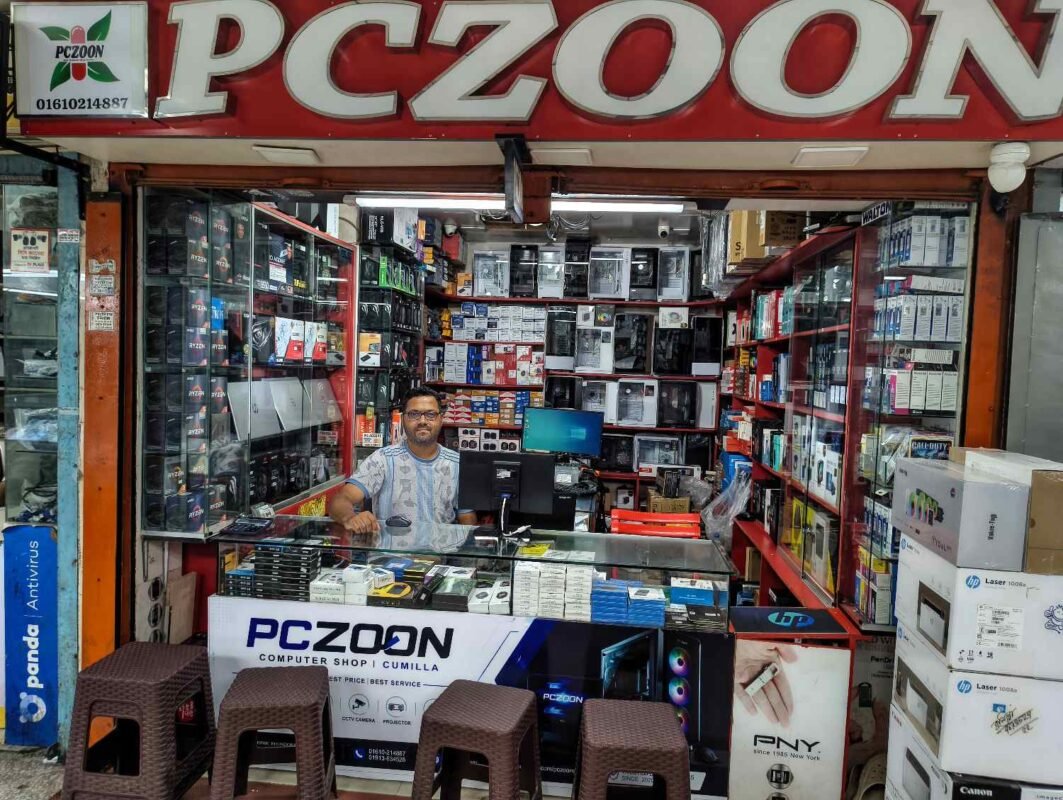
Looking for a desktop shop near me in Comilla where you can compare desktop computers, PC components, custom builds, and accessories? PCZOON provides a range of desktop computing products for students, professionals, offices, businesses, gamers, freelancers, and home users.
A desktop computer can be configured for many different purposes. A basic office computer does not need the same hardware as a gaming PC, graphics workstation, or professional editing system. Choosing the right processor, motherboard, RAM, storage, power supply, graphics card, monitor, and cooling system can make a significant difference to the overall experience.
PCZOON offers desktop computers and individual PC components so customers can either purchase a ready-to-use desktop or build a system around their own requirements and budget.
The store is located at F-508, 3rd Floor, Khondokar Haque Tower, Kandirpar, Comilla, Bangladesh, making it a convenient local option for customers looking for desktop computers and PC components in Comilla.
Desktop Computers at PCZOON
A desktop PC remains a practical choice for users who want good performance, upgrade flexibility, and a comfortable workstation.
Compared with many laptops, desktop computers can provide greater flexibility when upgrading components such as RAM, storage, graphics cards, cooling systems, and other hardware.
PCZOON offers desktop solutions for different types of users.
Basic Desktop PC
A basic desktop computer is designed for everyday computing tasks such as:
- Web browsing
- Microsoft Office
- Online classes
- Social media
- Accounting
- Document preparation
- Basic business applications
A typical entry-level system may use an integrated graphics solution, modest RAM, and SSD storage to provide responsive everyday performance.
This type of desktop can be suitable for students, home users, reception desks, small businesses, and general office work.
Office Desktop Computer
Office computers are designed around productivity rather than gaming performance.
A suitable office PC can be used for:
- Word processing
- Spreadsheets
- Accounting software
- Printing
- Web applications
- Business management software
- Video conferencing
- Data entry
When selecting an office PC, reliability, storage, RAM, connectivity, and ease of maintenance may be more important than having a powerful graphics card.
Student Desktop PC
Students may use a desktop computer for online classes, research, assignments, programming, browsing, presentations, and other educational tasks.
An affordable system with a capable processor, sufficient RAM, and SSD storage can provide a good starting point.
As requirements increase, additional RAM, storage, or a dedicated graphics card can be added depending on the motherboard and power supply.
Home Desktop Computer
A home PC can be used by multiple family members for browsing, entertainment, study, office work, printing, video calls, and general computing.
A balanced configuration is often preferable to spending too much of the budget on a single component.
Business Desktop PC
Businesses may require multiple desktop computers for employees, accounting, sales, administration, inventory, customer service, and other tasks.
For business environments, the configuration should be selected according to the software being used rather than simply choosing the highest specification available.
Custom Desktop PC
A custom desktop allows the user to choose individual components according to their needs.
A custom build can be configured around:
- Processor
- Motherboard
- RAM
- SSD
- Graphics card
- Power supply
- PC case
- CPU cooler
- Case fans
- Monitor
- Keyboard
- Mouse
This approach can be useful when you have a specific budget or performance target.
Gaming Desktop PCs
Gaming computers require different hardware priorities from standard office systems.
A gaming PC may include a powerful processor, dedicated graphics card, faster RAM, NVMe SSD, suitable cooling, and a reliable power supply.
The appropriate configuration depends on:
- Games you play
- Target resolution
- Desired frame rate
- Monitor refresh rate
- Graphics settings
- Streaming requirements
- Future upgrade plans
A balanced gaming PC is usually better than spending most of the budget on one component while using entry-level hardware elsewhere.
Professional and Performance Desktop PCs
Some users need more performance for demanding applications such as:
- Video editing
- Photo editing
- 3D design
- CAD
- Architecture
- Programming
- Software development
- Animation
- Content creation
- Data processing
These systems may require additional CPU cores, more RAM, dedicated graphics, high-speed storage, and stronger cooling.
The correct specification depends on the applications and workloads involved.
Desktop PC Components
One advantage of shopping for a desktop system is that every major component can be selected according to the intended use.
Below are the key components available for desktop builds.
Desktop Processor / CPU
The processor is one of the most important components of a desktop PC.
It performs the calculations and instructions required by applications and the operating system.
PCZOON can provide processors from major CPU platforms, including desktop processors suitable for everyday computing, gaming, office work, and more demanding applications.
When selecting a CPU, consider:
- Number of cores
- Number of threads
- Clock speeds
- Integrated graphics
- Socket type
- Generation
- Power requirements
- Intended applications
A processor should always be selected together with a compatible motherboard.
AMD Ryzen Processors
AMD Ryzen processors are popular for desktop systems ranging from affordable everyday PCs to gaming and performance-oriented builds.
Different Ryzen models provide different combinations of cores, threads, integrated graphics, cache, and performance.
For example, processors with integrated Radeon graphics can be useful for systems that do not initially require a dedicated graphics card.
Higher-performance Ryzen processors can be paired with dedicated graphics cards for gaming and professional workloads.
Intel Core Processors
Intel Core desktop processors are widely used for office computers, gaming PCs, productivity systems, and other desktop applications.
Different generations and models offer varying levels of CPU performance, integrated graphics, power consumption, and platform features.
When choosing an Intel processor, compatibility with the motherboard socket and supported memory technology should be checked carefully.
Motherboards
The motherboard connects the major components of a desktop computer.
It determines compatibility and provides interfaces for the processor, RAM, storage, graphics card, USB devices, networking, and other hardware.
Important motherboard specifications include:
- CPU socket
- Chipset
- RAM type
- Maximum RAM capacity
- M.2 slots
- SATA ports
- PCIe slots
- USB ports
- Display outputs
- Network connectivity
- Wi-Fi availability
PCZOON offers motherboard options for different desktop platforms and budgets.
AMD AM4 Motherboards
AM4 motherboards support a wide range of compatible AMD Ryzen processors depending on the chipset and BIOS support.
They can be used for budget PCs, office systems, home computers, and gaming builds.
AMD AM5 Motherboards
AM5 is a newer AMD desktop platform designed for compatible Ryzen processors using DDR5 memory.
It can be suitable for customers building a newer-generation desktop with future upgrade considerations.
Intel Motherboards
Intel-compatible motherboards are available in different chipsets and specifications.
The motherboard must match the processor socket and supported generation.
Desktop RAM
RAM provides temporary working memory for applications and the operating system.
Insufficient RAM can make multitasking more difficult, while adequate memory allows the system to handle more applications comfortably.
Desktop RAM is available in different capacities and generations.
Common considerations include:
- Capacity
- DDR generation
- Speed
- Number of modules
- Motherboard compatibility
For a new desktop, selecting the right RAM from the beginning can make future upgrades easier.
8GB RAM
8GB can be suitable for basic computing, office work, browsing, and light everyday applications.
It may also serve as an entry point for an affordable desktop.
16GB RAM
16GB provides more room for multitasking and is a common choice for many modern desktop systems.
It can be suitable for gaming, productivity, programming, and general professional use.
32GB or More
Higher-capacity RAM can be useful for video editing, advanced multitasking, development environments, 3D applications, and other memory-intensive workloads.
SSD Storage
An SSD can significantly improve the responsiveness of a desktop computer compared with a traditional hard drive.
It can reduce operating-system boot times and make applications load more quickly.
SSD options include:
- SATA SSD
- M.2 SSD
- NVMe SSD
NVMe SSD
NVMe SSDs use the PCIe interface and can provide high storage performance on compatible systems.
They are popular for modern desktops because of their compact design and high performance.
A desktop with an NVMe SSD can provide fast system startup, application loading, and file operations.
SATA SSD
SATA SSDs are another practical storage option.
They are compatible with many desktop systems and can be useful for upgrading older computers.
Hard Disk Drives
HDDs remain useful when large storage capacity is required at a lower cost per gigabyte.
They can be used for:
- File storage
- Media collections
- Backups
- Archives
- CCTV recording
- Secondary storage
A common desktop configuration can use an SSD for the operating system and applications, with an HDD providing additional storage capacity.
Graphics Cards / GPU
A dedicated graphics card is important for many gaming and professional workloads.
A GPU handles graphics processing and can significantly affect performance in games and applications that use GPU acceleration.
Graphics cards can be used for:
- Gaming
- Video editing
- 3D rendering
- CAD
- Animation
- AI-related workloads
- High-resolution displays
- Creative applications
The graphics card should be selected together with the processor, monitor, power supply, and intended workload.
Power Supply Unit / PSU
The power supply provides electrical power to all major desktop components.
A reliable PSU is important because unstable or insufficient power can affect system reliability.
When choosing a PSU, consider:
- Wattage
- Efficiency rating
- Connectors
- Build quality
- GPU requirements
- CPU requirements
- Upgrade plans
Avoid selecting a power supply based only on the wattage number.
PC Cases
The case houses the desktop components and contributes to airflow, cable management, expansion options, and overall appearance.
Cases are available in different sizes and layouts.
Common categories include:
- Mini Tower
- Micro-ATX
- Mid Tower
- Full Tower
- Gaming cases
A case should be compatible with the motherboard size, graphics card length, CPU cooler height, and power supply format.
CPU Coolers
A CPU cooler helps keep the processor within an appropriate operating temperature range.
Depending on the processor and workload, users may choose between:
- Stock coolers
- Air coolers
- Tower coolers
- Liquid cooling systems
A powerful processor may require a stronger cooling solution, particularly under sustained workloads.
Case Fans
Additional case fans can improve airflow by moving cool air into the case and warm air out.
Proper airflow can help maintain stable temperatures for the CPU, GPU, motherboard, and other components.
The number and placement of fans should be matched to the case design.
Liquid CPU Coolers
Liquid cooling systems use a radiator, pump, and liquid-filled loop to transfer heat away from the processor.
They are often selected for performance-oriented builds and systems where cooling capacity and aesthetics are important.
The cooler must be compatible with the CPU socket and physically fit inside the case.
Desktop Monitors
A desktop computer requires a display unless one is already available.
Monitors differ in:
- Screen size
- Resolution
- Refresh rate
- Panel type
- Response time
- Connectivity
- Adaptive-sync support
Full HD Monitor
Full HD monitors are suitable for general computing, office work, education, browsing, and many gaming setups.
High Refresh Rate Monitor
Monitors with higher refresh rates can provide smoother motion and are particularly useful for gaming.
IPS Monitor
IPS displays are popular for their viewing angles and image quality and can be useful for general work, content creation, and entertainment.
Keyboard and Mouse
A desktop setup also needs input devices.
PCZOON offers keyboard and mouse options for different uses, including:
- Office work
- Study
- General computing
- Gaming
- Professional use
Gaming keyboards and mice may provide additional features such as programmable buttons, adjustable settings, or RGB lighting.
Headsets and Speakers
Audio accessories can be added to a desktop for meetings, gaming, music, entertainment, and communication.
Depending on the user’s requirements, options can include wired headsets, wireless headsets, gaming headsets, headphones, and desktop speakers.
Webcam
A webcam can be useful for:
- Online classes
- Video conferences
- Remote work
- Online meetings
- Content creation
- Communication
A suitable webcam should be selected based on resolution, microphone quality, connection type, and intended use.
Wi-Fi and Bluetooth Adapters
Not every desktop motherboard includes wireless connectivity.
A Wi-Fi adapter can add wireless network access, while a Bluetooth adapter can connect compatible wireless devices such as headphones, keyboards, mice, and other peripherals.
UPS for Desktop Computers
A UPS can provide temporary backup power and protection during power interruptions.
This can be particularly useful for desktop computers used for business, office work, accounting, or other tasks where sudden shutdowns can cause inconvenience or data loss.
Desktop Accessories
A complete desktop setup may also require:
- Mouse pads
- USB hubs
- HDMI cables
- DisplayPort cables
- Power cables
- Speakers
- Webcams
- Wi-Fi adapters
- Bluetooth adapters
- Cooling pads and fans
- Monitor stands
- Monitor mounts
- Surge protection
- Cleaning products
Choosing compatible accessories can make the final setup more convenient and organized.
New Desktop PC vs Custom PC Build
Both ready-made desktop computers and custom-built systems have their advantages.
A ready-made PC can be convenient when you want a complete computer quickly.
A custom build can be preferable when you want precise control over the components.
With a custom build, you can decide:
- Which processor to use
- How much RAM you need
- Which SSD to install
- Whether you need a graphics card
- Which case to choose
- Which PSU to use
- What cooling solution is appropriate
- Which monitor fits your needs
Desktop PC for Different Budgets
Entry-Level Desktop
An entry-level desktop focuses on essential computing and may use integrated graphics to keep the total cost lower.
It can be suitable for office applications, education, browsing, and basic home use.
Mid-Range Desktop
A mid-range system can provide a stronger balance between CPU performance, RAM, storage, and graphics.
It can be suitable for productivity, programming, moderate gaming, and more demanding everyday applications.
Gaming Desktop
Gaming systems generally prioritize the graphics card while maintaining a balanced CPU, memory, storage, cooling, and power supply configuration.
High-Performance Desktop
High-performance desktops are designed for demanding workloads such as professional editing, 3D work, rendering, advanced development, and high-end gaming.
Why Buy Your Desktop PC from PCZOON?
Buying a desktop computer is a significant decision because the components determine the performance, upgrade options, and long-term usability of the system.
PCZOON focuses on helping customers select a configuration based on what they actually need.
Complete Desktop Solutions
You can explore complete desktop computers as well as individual components.
This is useful whether you want a ready-to-use PC or want to build a system component by component.
Custom PC Building
Customers can discuss their requirements and budget and choose components appropriate for their intended use.
A custom configuration can be designed for:
- Office work
- Education
- Home use
- Freelancing
- Programming
- Gaming
- Graphic design
- Video editing
- Business applications
Genuine PC Components
PCZOON focuses on providing genuine computer hardware and accessories from established brands.
Customers can compare specifications before choosing components for their desktop.
Balanced Configurations
A desktop PC should be built as a complete system rather than focusing on one specification.
For example, a powerful graphics card needs an appropriate processor, motherboard, PSU, cooling system, and case.
PCZOON can help customers consider the complete configuration.
Upgrade-Friendly Options
One advantage of desktop computers is their upgrade potential.
Depending on the motherboard and case, users may later upgrade:
- RAM
- SSD
- HDD
- Graphics card
- CPU
- Cooling
- Power supply
Planning for future upgrades during the initial build can sometimes save money later.
Local Support in Comilla
Buying locally can make it easier to discuss component compatibility, desktop configuration, upgrades, and technical requirements.
PCZOON is located at Khondokar Haque Tower, Kandirpar, Comilla, providing a local option for customers searching for desktop computers and PC components.
After-Sales Support
PCZOON also provides computer-related support and servicing. Customers can contact the store regarding available support, upgrades, maintenance, and other technical requirements.
How to Choose the Right Desktop PC
Before buying a desktop computer, consider the following:
Identify Your Main Use
First determine whether the computer will be used for office work, study, gaming, programming, editing, business software, or a combination of tasks.
Set a Realistic Budget
Decide the total budget for the complete setup, including the monitor and accessories if required.
Choose the Processor
Select a processor appropriate for your applications and compatible with your motherboard.
Select Enough RAM
Choose enough RAM for your current applications while considering future upgrades.
Use SSD Storage
An SSD is generally recommended for the operating system and everyday applications because of its responsiveness.
Add a Dedicated GPU When Needed
If you play modern games or use GPU-intensive applications, a dedicated graphics card may be necessary.
Choose a Reliable PSU
The PSU should provide enough capacity and the correct connectors for the complete system.
Consider Cooling
Higher-performance components may require additional cooling.
Think About Future Upgrades
Check available RAM slots, M.2 slots, PCIe expansion, PSU capacity, and case compatibility if future upgrades are important.
Desktop Shop Near Me in Comilla
If you are searching for a desktop shop near me, desktop computer shop in Comilla, PC shop in Comilla, or a place to build a custom computer, PCZOON offers desktop PCs and individual components for different types of users.
From an affordable office computer to a custom gaming PC, the right configuration depends on your requirements rather than simply choosing the most expensive hardware.
PCZOON is located at:
F-508, 3rd Floor, Khondokar Haque Tower, Kandirpar, Comilla, Bangladesh
Phone: 01610-214887
Website: https://pczoon.com
Frequently Asked Questions About Desktop Computers
1. Where can I find a desktop shop near me in Comilla?
PCZOON is a computer and technology store located at Khondokar Haque Tower, Kandirpar, Comilla, offering desktop PCs, components, accessories, and custom computer solutions.
2. Does PCZOON sell desktop computers?
Yes. PCZOON offers desktop computer solutions for home, office, education, business, gaming, and other requirements, subject to current availability.
3. Can I build a custom PC at PCZOON?
Yes. Customers can select individual components for a custom desktop configuration based on their budget and intended use.
4. Which processor is better for a desktop, Intel or AMD?
Both Intel and AMD offer processors for different budgets and workloads. The better option depends on the specific model, motherboard platform, applications, and total system requirements.
5. How much RAM does a desktop need?
The required RAM depends on the workload. Basic users may be comfortable with a lower capacity, while gaming, professional applications, programming, and heavy multitasking may benefit from 16GB, 32GB, or more.
6. Is an SSD necessary for a desktop?
An SSD is highly recommended for modern desktop systems because it can provide faster system startup and application loading than a traditional hard drive.
7. Should I buy an NVMe SSD or SATA SSD?
An NVMe SSD can provide higher performance on compatible systems, while SATA SSDs remain useful and compatible with many computers. The right choice depends on the motherboard, workload, and budget.
8. Do I need a graphics card?
Not necessarily. Basic desktop users may be able to use integrated graphics if the processor provides it. Gaming and many professional graphics workloads may require a dedicated GPU.
9. Which graphics card should I buy?
The right GPU depends on your games or applications, monitor resolution, target performance, budget, PSU capacity, and other system components.
10. What is the difference between a normal PC and a gaming PC?
A gaming PC generally uses a dedicated graphics card and a balanced combination of CPU, RAM, storage, cooling, and power supply designed for gaming workloads.
11. Can I upgrade my desktop later?
Yes, desktops are generally upgradeable. Depending on the hardware, you may upgrade RAM, storage, graphics cards, processors, cooling, and other components.
12. Is a custom PC better than a pre-built desktop?
A custom PC provides more control over individual components, while a pre-built system can be more convenient. The better choice depends on your budget and requirements.
13. What motherboard should I choose?
The motherboard should be selected according to the processor platform, RAM type, expansion requirements, storage needs, and connectivity features.
14. What PSU wattage do I need?
PSU requirements depend on the CPU, graphics card, other components, and future upgrades. It is better to calculate the complete system requirement instead of choosing based only on a general wattage number.
15. Why is PSU quality important?
The PSU supplies power to every major component. A suitable, reliable PSU helps provide stable power and appropriate protection for the system.
16. Do gaming PCs need extra cooling?
It depends on the components. Higher-performance CPUs and GPUs may generate more heat and can benefit from appropriate case airflow and CPU cooling.
17. What size PC case should I buy?
The case should support the motherboard size and have enough room for the graphics card, CPU cooler, PSU, storage, and required fans.
18. Can I use an office PC for gaming?
Some office PCs can handle light or older games, particularly if they have suitable integrated or dedicated graphics. Modern demanding games generally require stronger hardware.
19. Can a desktop be used for video editing?
Yes. Video editing systems can benefit from a capable multi-core processor, sufficient RAM, fast storage, and an appropriate graphics card depending on the software and workload.
20. Is 16GB RAM enough for gaming?
16GB can be sufficient for many gaming systems, although requirements vary by game and background applications.
21. Is 8GB RAM enough for an office PC?
8GB can be suitable for many basic office tasks, although users with heavier multitasking may benefit from additional RAM.
22. Can I use both SSD and HDD in one desktop?
Yes. A common configuration is to use an SSD for the operating system and applications and an HDD for additional storage.
23. Does PCZOON sell desktop RAM?
Yes. PCZOON offers desktop memory options depending on current stock and platform compatibility.
24. Does PCZOON sell graphics cards?
PCZOON offers graphics cards depending on current inventory and availability.
25. Does PCZOON sell motherboards?
Yes. PCZOON offers motherboard options for different desktop platforms and configurations.
26. Can I buy a complete PC with a monitor?
Complete desktop packages can include a monitor and other accessories depending on the selected configuration and current offers.
27. Does PCZOON sell gaming PCs?
Yes. PCZOON offers gaming-oriented desktop configurations and individual gaming components depending on current availability.
28. Can I upgrade an old desktop?
Many older desktops can be upgraded. The available upgrade options depend on the motherboard, processor platform, RAM type, PSU, case, and other existing components.
29. Can PCZOON help choose PC components?
Yes. You can discuss your budget and intended applications with PCZOON and compare compatible component options.
30. Does PCZOON provide computer servicing?
PCZOON provides computer-related technical support and servicing. Contact the store to confirm the current service availability for your specific requirement.
31. Where is PCZOON located in Comilla?
PCZOON is located at F-508, 3rd Floor, Khondokar Haque Tower, Kandirpar, Comilla, Bangladesh.
32. How can I contact PCZOON?
You can contact PCZOON at 01610-214887 or visit the website at pczoon.com for computer and technology products.
Build Your Next Desktop with PCZOON
A desktop computer should be selected around the way you actually work, study, play, or create. Whether you need a simple home computer, an office workstation, a programming PC, a gaming system, or a high-performance custom build, choosing compatible components is essential.
PCZOON provides desktop computers, processors, motherboards, RAM, SSDs, graphics cards, power supplies, cases, cooling products, monitors, and accessories so customers can create a setup that matches their needs.
If you are looking for a desktop shop near me in Comilla, visit PCZOON at Khondokar Haque Tower, Kandirpar, or contact the store to discuss the desktop configuration you need.
PCZOON — Desktop PCs, Components & Custom Computer Solutions in Comilla.