

Router Shop Near Me in Comilla: Wi-Fi Routers, Networking Products & Internet Solutions | PCZOON

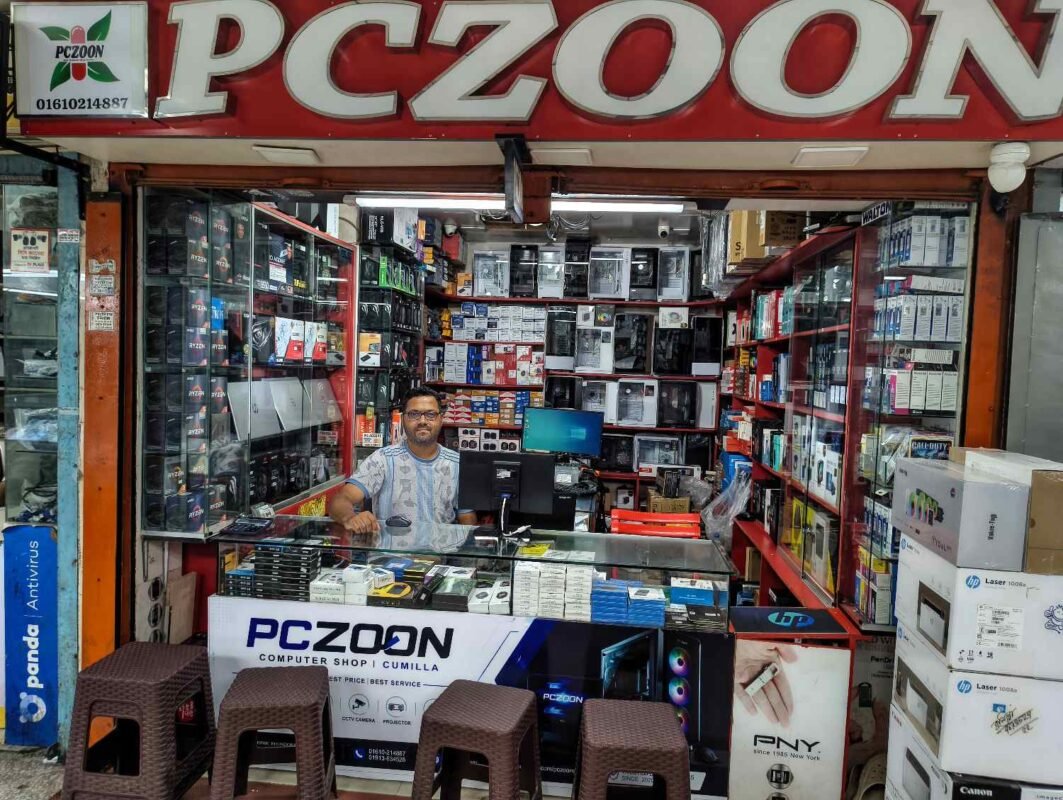
If you are searching for a router shop near me in Comilla, PCZOON offers a range of networking products for homes, offices, shops, businesses, students, gamers, and other users who need a stable internet connection. Choosing the right router is not only about getting the cheapest device. The number of connected devices, internet speed, coverage area, Wi-Fi standard, network usage, and available features can all affect which router is suitable.
PCZOON provides different types of routers and networking equipment from popular brands, along with related products such as ONU devices, switches, network cables, Wi-Fi accessories, and UPS solutions. Whether you need a basic home router, a dual-band wireless router, a high-performance Wi-Fi solution, or networking equipment for a larger setup, you can compare different options based on your requirements.
Located at F-508, 3rd Floor, Khondokar Haque Tower, Kandirpar, Comilla, PCZOON serves customers looking for computer, networking, and technology products in Comilla and surrounding areas.
What Can You Find at a Router Shop Near You?
A good networking store should offer more than a single type of wireless router. Different internet connections and usage environments require different equipment. Below are some of the main networking products you may need.
Wi-Fi Routers
A Wi-Fi router is the central device used to distribute an internet connection wirelessly and through Ethernet ports. It connects devices such as smartphones, laptops, desktop computers, smart TVs, printers, cameras, and gaming consoles to the network.
Routers are available with different wireless standards, speeds, antenna configurations, Ethernet port capabilities, and management features.
For a small home with normal browsing and streaming requirements, a basic wireless router may be enough. Larger homes, offices, or networks with many connected devices may require a more capable model.
When selecting a router, consider:
- Internet package speed
- Number of connected devices
- Required Wi-Fi coverage
- Number of LAN ports
- Wireless standard
- Dual-band capability
- Processor and memory
- Security features
- Parental controls
- Guest networking
- Quality of service features
Single-Band Wi-Fi Routers
Single-band routers generally operate on the 2.4GHz Wi-Fi band. They are suitable for basic networking requirements where users mainly browse websites, use social media, check email, attend online classes, and connect a limited number of devices.
They can be an economical choice for smaller setups.
A single-band router may be suitable for:
- Small homes
- Basic internet browsing
- A few smartphones
- Online classes
- Basic office use
- Light streaming
- Simple networking requirements
However, users with many wireless devices or demanding applications may benefit from a dual-band router.
Dual-Band Routers
Dual-band routers operate on both 2.4GHz and 5GHz wireless bands. This provides greater flexibility when connecting different devices.
The 2.4GHz band generally provides better range through walls, while the 5GHz band can offer higher wireless performance over shorter distances, depending on the router and environment.
Dual-band routers are useful for:
- Family homes
- Offices
- Streaming
- Online gaming
- Multiple smartphones and laptops
- Smart TVs
- Work-from-home setups
- General high-speed internet use
For many modern homes, a dual-band router is a practical choice because it allows compatible devices to use the more suitable wireless band.
Gigabit Routers
Gigabit routers include high-speed Ethernet ports capable of supporting Gigabit networking. They are useful when the internet connection, local network, or connected devices can take advantage of higher wired speeds.
They can be useful for:
- High-speed broadband connections
- Desktop computers
- Gaming PCs
- Network storage
- Office networks
- High-resolution media streaming
- Multiple wired devices
If your internet package has a high bandwidth, checking the router’s Ethernet port specification is important before buying.
Gaming Routers
Gaming routers are designed with features intended to help users manage networks where gaming and other demanding applications are important.
Depending on the model, features can include traffic prioritization, quality-of-service controls, better wireless performance, multiple antennas, advanced management options, and improved device handling.
A gaming router may be useful for users who have:
- Gaming PCs
- PlayStation or Xbox consoles
- Multiple online gaming devices
- Game streaming requirements
- Fast broadband connections
- Several simultaneous users
A gaming router cannot eliminate every source of latency because ping also depends on the ISP, server location, routing, and internet conditions. However, suitable network hardware can help create a better local network environment.
4G LTE Routers
A 4G LTE router uses a mobile network connection instead of requiring a traditional wired broadband connection.
These routers can be useful in locations where fixed broadband is unavailable or where users need an alternative internet connection.
Depending on the model, an LTE router may provide:
- SIM card connectivity
- Wi-Fi sharing
- Ethernet ports
- Multiple-device support
- External antenna support
- Mobile broadband access
Before purchasing an LTE router, check network compatibility with your mobile operator and the supported LTE bands.
5G Routers
5G routers are designed to use compatible 5G mobile networks and distribute the connection to multiple devices through Wi-Fi and wired Ethernet.
They can be considered for locations where 5G service is available and users require a fast wireless internet connection.
A 5G router can be useful for:
- Homes without reliable wired broadband
- Temporary offices
- Backup internet
- High-speed mobile broadband
- Remote work
- Multiple connected devices
Availability and performance depend heavily on the mobile network, signal strength, coverage, and service package.
Mesh Wi-Fi Systems
A mesh Wi-Fi system uses multiple interconnected units to provide broader wireless coverage than a single router.
Instead of depending on one router to cover an entire building, mesh units can be placed in different areas. This can help reduce weak-signal areas in larger homes or offices.
Mesh networking can be useful for:
- Large houses
- Multi-floor buildings
- Offices
- Shops
- Areas with Wi-Fi dead zones
- Networks with many wireless devices
Mesh systems are especially useful when the main problem is coverage rather than simply internet speed.
Wireless Access Points
A wireless access point extends or creates Wi-Fi connectivity for a network. Access points are commonly used in offices, shops, schools, hotels, and larger buildings where several wireless coverage areas are required.
An access point can be connected to a wired network and provide wireless connectivity to nearby users.
They are useful when building a more structured network rather than relying on a single consumer router.
Network Switches
A network switch allows multiple wired devices to communicate through Ethernet.
For example, an office may need to connect:
- Desktop computers
- Network printers
- IP cameras
- Access points
- Network storage
- NVR systems
- Other wired devices
Switches are available in different port counts and specifications. Depending on the network, you may need a standard switch, Gigabit switch, or PoE switch.
PoE Switches
A PoE, or Power over Ethernet, switch can transmit network data and electrical power through compatible Ethernet cables.
PoE switches are commonly used for:
- IP cameras
- Wireless access points
- VoIP equipment
- Other compatible network devices
They can simplify installations by reducing the need for separate power adapters at every device location.
When choosing a PoE switch, check the supported PoE standard, total power budget, port speed, and compatibility with the connected devices.
ONU / Optical Network Units
An ONU is commonly used with fiber-optic broadband connections. It converts the optical signal from a fiber network into an Ethernet/network connection that can be used by a router or other network equipment.
Depending on the ISP and fiber network, different ONU technologies may be used.
PCZOON can be a useful place to compare networking equipment such as ONU devices when building or upgrading a fiber-based internet setup.
Before purchasing an ONU, users should confirm compatibility with their internet service provider and connection type.
XPON ONU
XPON technology can support different types of passive optical network standards depending on the specific device and network configuration.
XPON ONUs can be useful where compatibility with the ISP’s optical network is required.
Because fiber network compatibility can vary, it is important to check the required technology before buying an ONU rather than selecting a device based only on price.
GPON ONU
GPON is a widely used passive optical networking technology. GPON ONUs are used in fiber-based broadband networks that use GPON infrastructure.
A suitable GPON ONU may be required depending on the ISP’s network architecture.
Users should confirm the required specifications with their internet provider before purchasing.
EPON ONU
EPON is another passive optical network technology used by some broadband providers.
EPON ONUs are designed for compatible EPON networks. The correct device depends on the ISP’s infrastructure and provisioning requirements.
If you are unsure whether you need GPON, EPON, or XPON equipment, checking with your ISP before purchasing is recommended.
Network Cables
A router is only one part of a wired network. Ethernet cables are equally important when connecting routers, switches, desktop computers, access points, CCTV equipment, and other devices.
Different network cable categories offer different performance characteristics.
Common Ethernet cable options include:
- Cat5e
- Cat6
- Cat6A
- Other compatible network cabling
For a new home or office network, choosing an appropriate cable can help support the desired network speed and installation requirements.
RJ45 Connectors
RJ45 connectors are used with Ethernet network cables. They are important for creating or repairing network cable connections.
A networking setup may require additional connectors when cables need to be terminated according to the required wiring standard.
Network Patch Cables
Patch cables are pre-terminated Ethernet cables used to connect networking equipment.
They are commonly used between:
- Router and computer
- Router and switch
- Switch and access point
- Switch and NVR
- Patch panel and switch
Different lengths can be useful depending on the location of the equipment.
Wi-Fi Adapters
A Wi-Fi adapter allows a desktop computer or another compatible device to connect to a wireless network.
USB Wi-Fi adapters are convenient for desktop users who do not have built-in Wi-Fi.
Depending on the adapter, users may get:
- 2.4GHz connectivity
- 5GHz connectivity
- Dual-band Wi-Fi
- Different wireless standards
- External or internal antennas
A suitable adapter can be useful when upgrading an older desktop computer.
USB Wi-Fi Dongles
USB Wi-Fi dongles are compact wireless adapters that can be connected directly to a computer’s USB port.
They are often used for desktops without built-in wireless networking or as a replacement for a damaged wireless adapter.
They are easy to install and can be a practical option for basic wireless connectivity.
Range Extenders
A Wi-Fi range extender or repeater can help extend wireless coverage to areas where the main router’s signal is weak.
It can be useful for:
- Bedrooms far from the router
- Different floors
- Small offices
- Shops
- Areas with weak Wi-Fi
However, an extender is not always the best solution. For larger networks, a mesh system or wired access point may provide a better approach.
Outdoor CPE / Wireless Networking Devices
Outdoor wireless networking equipment is designed for situations where normal indoor Wi-Fi equipment is not suitable.
Depending on the model, outdoor CPE devices can be used for point-to-point or point-to-multipoint wireless networking.
They can be useful for:
- Connecting separate buildings
- Outdoor coverage
- Business networking
- Long-distance wireless links
- Specialized network installations
The correct equipment depends on distance, line of sight, environment, bandwidth requirements, and installation conditions.
Router Accessories
A router installation may require several additional items depending on the setup.
Common accessories include:
- LAN cables
- RJ45 connectors
- Power adapters
- Network switches
- Wi-Fi adapters
- Cable clips
- Network tools
- Rack accessories
- Wall-mounting accessories
- Surge protection
- UPS systems
Having compatible accessories available makes it easier to complete a networking setup without purchasing every component separately from different sources.
Router Solutions for Different Users
Router for Home
A home user may need reliable Wi-Fi for smartphones, laptops, smart TVs, computers, and other connected devices.
For a typical home, a dual-band router can provide a practical balance between coverage and wireless performance.
The correct choice depends on the house size, number of users, internet package, and number of connected devices.
Router for Office
An office network may have many computers, printers, phones, access points, and other devices.
For this type of environment, network planning becomes more important. A router may need to work together with switches and access points rather than handling everything alone.
Router for Gaming
Gamers should look beyond the advertised wireless speed. Ethernet connectivity, latency management, QoS features, Wi-Fi performance, and network stability can all matter.
A wired Ethernet connection may still be preferable for a gaming PC or console when practical.
Router for Streaming
Homes using streaming services on several devices may benefit from a router that can efficiently handle multiple simultaneous connections.
Dual-band or higher-performance wireless equipment can be useful depending on the number of devices and internet speed.
Router for Small Business
Small businesses may need separate networks for employees and guests, multiple wired connections, stronger management features, and reliable wireless coverage.
A properly planned router-and-switch setup can be more suitable than a basic home router.
How to Choose the Right Router
Buying a router simply because it has a large advertised speed number is not always the best approach.
Consider these points before purchasing:
1. Check Your Internet Speed
Know the speed of your internet package before choosing networking equipment.
2. Count Your Devices
Consider smartphones, laptops, computers, TVs, cameras, printers, smart devices, and other equipment that will connect to the network.
3. Consider Coverage
A small room may need only one router, while a large home or multi-floor building may benefit from mesh Wi-Fi or additional access points.
4. Check Wi-Fi Bands
Dual-band routers provide both 2.4GHz and 5GHz connectivity. Newer models may support additional wireless technologies.
5. Check Ethernet Ports
If you use desktop computers, gaming systems, NVRs, access points, or switches, check the number and speed of LAN ports.
6. Consider Your Future Needs
A router should ideally support your expected usage for the coming years rather than only your current internet package.
7. Check ISP Compatibility
For fiber connections, verify whether your ISP requires a particular ONU or networking configuration.
Why Buy a Router from PCZOON?
Choosing the right networking product can sometimes be confusing because two routers may have similar-looking specifications but different capabilities.
PCZOON focuses on helping customers choose products according to their actual requirements instead of simply selecting the most expensive model.
Product Choices for Different Budgets
Different users have different networking requirements. A student, home user, office, gamer, shop owner, and business may not need the same router.
PCZOON offers networking products across different categories so customers can compare options according to their budget and usage.
Genuine Technology Products
When purchasing networking equipment, product authenticity and correct specifications are important. PCZOON focuses on supplying genuine IT and networking products from established brands and providing product information to help customers make an informed choice.
Networking Products in One Place
Instead of buying the router separately and then searching for cables, switches, adapters, ONU devices, or other accessories, customers can explore related networking products together.
This can make it easier to build a complete setup.
Helpful Product Selection
If you are unsure whether you need a basic router, dual-band router, mesh system, access point, switch, or ONU, discussing your requirements before buying can help prevent an unsuitable purchase.
After-Sales Support
Networking problems do not always originate from the router itself. Cable quality, ISP configuration, device placement, signal interference, and other factors can affect network performance.
PCZOON provides customer support around its range of computer and networking products, helping customers understand the equipment they purchase.
Convenient Local Shopping in Comilla
For customers searching online for a router shop near me in Comilla, a local technology store can provide the advantage of seeing available products and discussing requirements before purchasing.
PCZOON is located at:
F-508, 3rd Floor, Khondokar Haque Tower, Kandirpar, Comilla, Bangladesh
Phone: 01610-214887
Website: PCZOON.com
Router Shop Near Me: What Should You Check Before Buying?
Before purchasing a router, make a quick checklist:
- What is your internet package speed?
- How many devices will connect?
- Do you need 2.4GHz, 5GHz, or both?
- How large is the coverage area?
- Do you need Gigabit Ethernet?
- Do you need parental controls?
- Do you need guest Wi-Fi?
- Do you need VPN-related features?
- Is the router compatible with your ISP?
- Do you need an ONU?
- Would a mesh system be better?
- How many LAN ports are required?
- Do you need a switch?
- Do you need a Wi-Fi extender?
- Is a UPS required for your networking equipment?
Answering these questions can make router selection much easier.
Common Router Problems
Even a good router may not deliver the expected performance if the network is not configured correctly.
Common issues include:
Weak Wi-Fi Signal
The router may be too far from the connected device, or walls and other obstacles may reduce signal strength.
Slow Internet
Slow performance can be caused by the ISP, router, Wi-Fi interference, overloaded network, device limitations, or other factors.
Frequent Disconnection
Connection drops may be related to power problems, firmware, ISP issues, overheating, cable problems, or network configuration.
Limited Coverage
If one router cannot cover the entire building effectively, an access point or mesh Wi-Fi system may be a better solution.
Too Many Connected Devices
A basic router may struggle when many devices are connected simultaneously. A higher-capacity router or better network design may be necessary.
Local Router and Networking Products in Comilla
PCZOON provides computer and networking products for customers in Comilla who need equipment for homes, offices, businesses, shops, education, gaming, CCTV networks, and other applications.
The networking range may include:
- Wi-Fi routers
- Dual-band routers
- Gigabit routers
- Gaming routers
- 4G/5G networking products
- Mesh Wi-Fi
- Access points
- Network switches
- PoE switches
- ONU
- GPON/EPON/XPON devices
- Ethernet cables
- RJ45 connectors
- Wi-Fi adapters
- Range extenders
- Networking accessories
- UPS and power protection products
Product models and availability can change, so customers can contact PCZOON for current stock and specifications.
Frequently Asked Questions About Router Shops and Networking Products
1. Where can I find a router shop near me in Comilla?
PCZOON is a local computer and technology store located at Khondokar Haque Tower, Kandirpar, Comilla. The store offers routers and various networking products.
2. Does PCZOON sell Wi-Fi routers?
Yes. PCZOON offers different types of networking products, including Wi-Fi routers, depending on current stock and availability.
3. Which router is best for home use?
The best router depends on your internet speed, house size, number of devices, and usage. A dual-band router is a common choice for many modern homes.
4. Is a dual-band router better than a single-band router?
For many users, yes. Dual-band routers provide access to both 2.4GHz and 5GHz networks, giving users more flexibility when connecting devices.
5. Which router is suitable for gaming?
A router with good wireless performance, Gigabit Ethernet, QoS or traffic-management features, and sufficient capacity for your devices can be suitable for gaming.
6. Can I use a router for a fiber internet connection?
Yes, but the exact setup depends on your ISP. Some fiber connections require an ONU or ONT before the router.
7. What is an ONU?
An ONU, or Optical Network Unit, is networking equipment used in fiber-optic broadband systems to convert the optical connection into a network connection.
8. What is the difference between a router and an ONU?
An ONU connects to the fiber network, while a router manages and distributes the network connection to devices through Wi-Fi and Ethernet.
9. What is GPON?
GPON is a passive optical networking technology used by some fiber internet providers.
10. What is EPON?
EPON is another fiber-based passive optical networking technology used by compatible broadband networks.
11. What is XPON?
XPON refers to equipment designed to support certain combinations of passive optical network technologies, depending on the specific device.
12. Do I need a router and ONU separately?
Not always. Some devices combine multiple networking functions, while other installations use separate ONU and router equipment. The correct setup depends on the ISP and network design.
13. What is a Gigabit router?
A Gigabit router has Ethernet interfaces capable of supporting Gigabit-class wired networking under suitable conditions.
14. What is a mesh Wi-Fi system?
Mesh Wi-Fi uses multiple interconnected units to provide broader wireless coverage across a larger area.
15. Is a Wi-Fi extender the same as mesh Wi-Fi?
No. A traditional extender repeats or extends an existing wireless network, while a mesh system is designed as a coordinated multi-unit Wi-Fi network.
16. Can a router support many devices?
Yes, but the practical number depends on the router’s hardware, wireless technology, network traffic, and the type of connected devices.
17. Why is my Wi-Fi slow even though my internet package is fast?
Possible reasons include weak signal strength, interference, router limitations, device limitations, poor cable connections, ISP problems, or network congestion.
18. Why does my Wi-Fi disconnect frequently?
Frequent disconnections can result from router configuration, power problems, firmware, ISP issues, overheating, wireless interference, or faulty cables.
19. Where should I place my Wi-Fi router?
For better general coverage, place the router in a relatively central, elevated, and open location rather than inside a cabinet or behind large obstacles.
20. Can I use a router for CCTV cameras?
Yes. Routers are commonly part of IP CCTV networks, particularly when cameras require local network connectivity or remote access.
21. Do I need a switch with my router?
You may need a switch if you have more wired devices than the router’s available LAN ports or if your network requires additional Ethernet connections.
22. What is a PoE switch?
A PoE switch can provide both network connectivity and electrical power to compatible devices through Ethernet cables.
23. Can a PoE switch be used for IP cameras?
Yes. Compatible IP cameras can receive network connectivity and power through a suitable PoE switch.
24. Can I connect a printer to my router?
If the printer supports network connectivity, it may be connected through Wi-Fi or Ethernet depending on the printer’s features.
25. Can a router improve my internet speed?
A router cannot increase the speed provided by your ISP beyond the capabilities of the internet connection. However, replacing an outdated or unsuitable router can improve local network performance.
26. What router should I buy for a large house?
A mesh Wi-Fi system or a router combined with properly positioned access points may be more suitable than relying on a single router.
27. What router is suitable for an office?
Office requirements vary. A suitable setup may include a capable router, Gigabit switches, access points, and appropriate network cabling.
28. Can PCZOON help me choose a router?
Yes. You can discuss your internet speed, number of devices, coverage requirements, and intended use with PCZOON before selecting a suitable networking product.
29. Does PCZOON sell networking accessories?
PCZOON offers networking-related products such as cables, connectors, switches, adapters, ONU devices, and other accessories depending on current availability.
30. Does PCZOON sell ONU devices?
PCZOON offers ONU and related fiber networking products depending on current stock and compatibility requirements.
31. Can I buy a router for a small shop?
Yes. A basic or business-oriented router may be suitable depending on the number of users, devices, CCTV cameras, and internet requirements.
32. Can I use a router for online classes?
Yes. A suitable home router can connect laptops, smartphones, tablets, and other devices used for online classes.
33. Is 5GHz always better than 2.4GHz?
Not necessarily. 5GHz can provide higher wireless performance at shorter distances, while 2.4GHz generally offers better range and wall penetration. The best choice depends on the environment and device.
34. Do routers need UPS backup?
A UPS can help keep networking equipment powered during short power interruptions, which can be useful for homes, offices, shops, and CCTV systems.
35. Where is PCZOON located?
PCZOON is located at F-508, 3rd Floor, Khondokar Haque Tower, Kandirpar, Comilla, Bangladesh.
36. How can I contact PCZOON?
You can contact PCZOON at 01610-214887 or visit the PCZOON website to explore available computer and networking products.
Find the Right Networking Equipment at PCZOON
A reliable internet connection depends on more than the broadband package itself. The router, ONU, switches, cables, access points, Wi-Fi adapters, and overall network design can all affect how the connection works in your home or workplace.
If you are searching for a router shop near me, Wi-Fi router shop in Comilla, networking shop in Comilla, or a place to buy networking equipment for your home or business, PCZOON provides a range of computer and networking products in one location.
Rather than choosing a router based only on its advertised speed, consider your actual internet package, coverage requirements, connected devices, and future needs. The right equipment can make your network easier to manage and better suited to your everyday usage.